Work From Home Solutions
Enable remote work while securing your data. Barracuda keeps remote employees connected, productive, and protected on any device.

Office-Based Employees Have Become Remote Workers
Remote working brings new security risks and productivity challenges. Barracuda can help secure your data and infrastructure while ensuring reliable connections to maintain employee productivity.
Already deployed CloudGen Firewall?
Contact us to activate Advanced Remote Access (ARA) to handle the influx of temporary remote workers. ARA includes everything you need to keep your workforce secure and connected: Network Access Client, Browser Remote Access (SSL-VPN), and CudaLaunch (mobile app).
Contact UsReliable remote connectivity
Provide remote users with VPN access from any device with better performance than traditional IPsec-based VPNs.
Zero touch provisioning
Centrally manage large deployments with minimal IT resources. Users can download and access apps without elevated privileges on their device.
24x7 support
We are committed to being a full partner in your business security. Our support is available around the clock with no phone queues.
Start Your Remote Access with Barracuda CloudGen Firewall
Run CloudGen Firewall as a dedicated appliance or in your own virtualized environment.


Secure Remote Access for Every User and Device
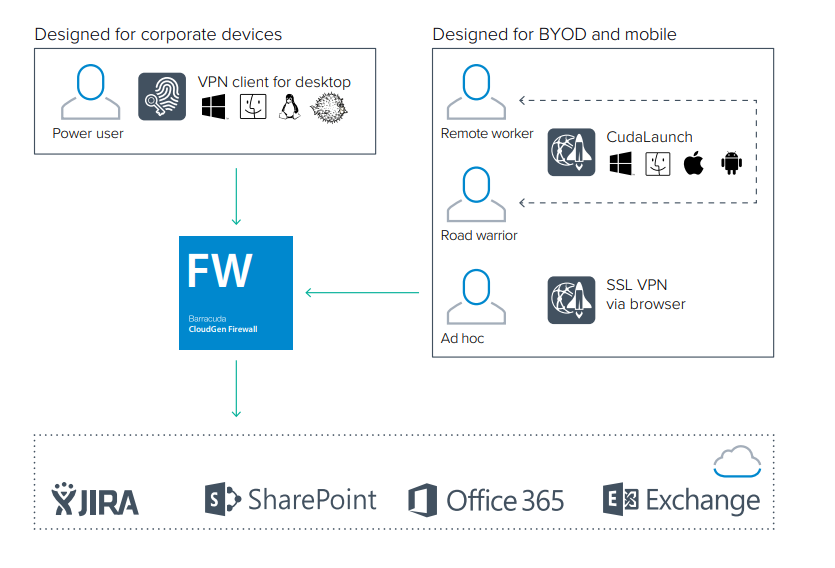
Desktop VPN for corporate devices, browser access for ad-hoc users, and an app for BYOD and mobile, all managed from one place.
Expand your corporate office infrastructure with secure remote access
Barracuda’s Network Access Client provides sophisticated VPN connectivity for Windows, macOS, and Linux with richer performance and functionality than standard IPsec client software. Capabilities include:
- Quick restoration of VPN tunnels
- “Always On” VPN connections for desktops and notebooks
- Redundant VPN gateway support
- Selective routing of network traffic through the VPN tunnel
- Optimal VPN-gateway detection based on location
The Barracuda Network Access Client provides centrally managed Network Access Control (NAC) and an advanced personal firewall. This enforces client health and security policies for remote users connecting to the corporate network.

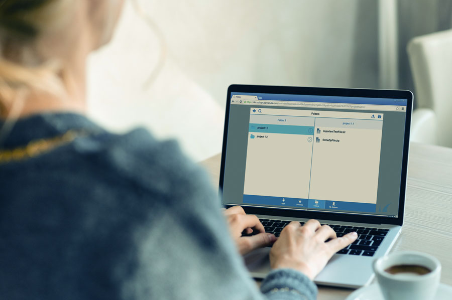
Secure remote access from any device, no need for pre-installed software
For ad-hoc access to company resources, the SSL-VPN portal provides simple browser-based remote access on desktop or mobile devices. When accessing the portal via the web browser on a desktop or mobile device, users can browse apps, network folders, and files as if they were connected to the office network. The SSL-VPN portal supports all commonly used devices.
Secure remote access via smartphones and tablets
CudaLaunch is a simple-to-use remote connectivity application specifically designed to securely extend the company network to BYOD and mobile devices. The app is available for Windows, macOS, iOS, and Android and is available for download from the respective app stores. End users can install the app without elevated privileges on the device. CudaLaunch looks and feels the same on every platform and provides fast, Java-independent access to commonly used applications in the company network – regardless if hosted on premises or in the cloud.


Centrally manage all remote users and offices
Zero-touch provisioning lets you manage all security policies from a single location even with thousands of remote users connecting through a variety of technologies such as mobile apps, SSL-VPN, Barracuda Network Access Client, and standard IPsec VPN connections.
End users with mobile devices can download the CudaLaunch remote access client with no elevated permissions needed on their devices. CudaLaunch’s zero-touch administration features drastically reduce support and administration costs for rapidly changing mobile and BYOD devices.
Need Help Getting Your Team Online?
Tell us how many remote users you need to support, and a Barracuda specialist will help you get them connected securely.
Barracuda Essentials
Email Continuity Service
Email continuity should be part of your current business continuity plan. In the event of an Exchange server failure or an Office 365 outage, Barracuda Email Continuity Service allows IT administrators to failover to third-party cloud-based email servers to continue email operations until services are restored.
During this failover time, Barracuda’s Email Continuity Service allows end-users to send, receive, compose, and forward emails when email services are unavailable. This keeps the company moving and employees productive so that orders can be processed, customer and vendor communication can continue, and any other operations that require email continue seamlessly.
Barracuda Essentials includes Email Continuity Service, which ensures that email operations continue. An emergency mailbox lets users continue to send and receive emails, staying productive until your primary servers are back online. Existing customers should make sure they have this functionality enabled.

Featured Remote Work Products


Contact us now, and we’ll get you up and running.
Whether you are rolling out remote access for the first time or adding capacity to an existing CloudGen Firewall, our specialists will help you choose and deploy the right solution.
- Activate Advanced Remote Access on your CloudGen Firewall
- Size VPN and SSL-VPN capacity for your remote workforce
- Enable Email Continuity for Barracuda Essentials
Prefer to talk? Call 800-878-6893.