Barracuda Networks PST Enterprise
Locate PST Files, Regain Control Over Them, and Manage Them Effectively and Efficiently

Sorry, this product is no longer available, please contact us for a replacement.
 Barracuda PST Enterprise Overview:
PST Enterprise enables IT administrators to regain control over email data stored by end users in individual PST files and scattered across their organization. It can eliminate the risks associated with PST files, as well as reducing ongoing costs and supporting IT requirements for Compliance and eDiscovery.
The Barracuda Advantage
- Zero Footprint Client minimizes impact on end users
- Parallel Processing avoids throttling & improves performance
- Minimizes network impact by migration directly to mailbox
- Determines ownership intelligently based on content
- Discovers all PST files regardless of location and state
- Selective processing migrates only data that is needed
Product Spotlight
- Fully automated and centrally managed operation
- Highly scalable and suitable for enterprise-level use
- Wide choice of PST processing options
- Disconnects and deletes files after migration
- Supports Office 365 as well as all recent Exchange versions
- Self-service portal allows users to determine processing
Complete PST Management for Your Organization
PST Enterprise enables IT administrators to regain control over email data stored within PST files scattered across their organization.
It can eliminate the risks associated with PST files, as well as reduce ongoing costs and support IT requirements for Compliance and eDiscovery.
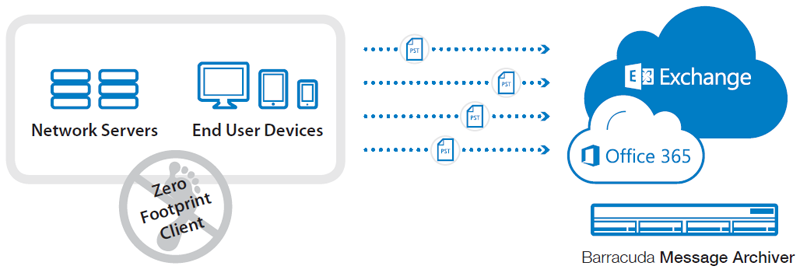
PST Enterprise will discover PST files on network servers and end user systems, and migrate this data to a secure location such as Exchange, Office 365 or Barracuda Message Archiver.
PST files pose a significant challenge to many organizations today. Often used by end users as personal archives for email, they are scattered across end user systems and network storage and are not managed consistently or effectively – if they are managed at all.
They constitute a hidden threat because they can exist outside the corporate environment, are difficult to discover and even more difficult to search. As they are not usually backed up, they leave end users and the business vulnerable to data loss.
Because PST files typically do not comply with an organization's information management and compliance policies they also represent an ongoing legal risk and will complicate any eDiscovery processes.
Recent versions of Microsoft Exchange and Office 365 now provide more effective capabilities to retain and manage email centrally so end users no longer have a need to store email locally within PST files. However some users continue to rely on PST files and there may also be a lot of existing data within legacy PST files that needs to be migrated into the new environment.
PST Enterprise addresses this by discovering PST files wherever they are located across the organization and then migrating the data contained within back into their corporate email environment. It is a highly scalable solution that is suitable for the largest enterprises as well as smaller organizations.
Regain control of all email across the organizationIdentify all email stored across the organization and manage appropriately so that it is secure and readily available. Centralize storage and backup, or better still, eliminate the use of PST files to regain control of data and reduce the support overhead of these unreliable files. |
|
Reduce legal and corporate risksMake all information visible and accessible so that in the event of an investigation or litigation, all data across the organization can be searched. Protect against end user data loss or theft by either controlling PST files or migrating the data needed from them and deleting them. |
|
Ensure data compliance and securityImplement robust data retention and defensible deletion policies to reduce costs and ensure compliance with any relevant government and corporate information management policies. Centralizing the information within PST files will help enable discovery and investigative requests. |
Benefits:
|
|
|


 Ensure Compliance and Information Security
Features:
Complete PST discovery
Locate all PST files wherever they exist across the organization by scanning end user devices, network drives and Outlook profiles. Files will be discovered whether they are connected to an Outlook profile or not, and can be accessed even if they are password‑protected.
Zero Footprint client
The non-invasive client application is downloaded automatically as required and runs in memory without impacting end users
Automatic Ownership
PST files not connected to an Outlook profile can have their ownership determined automatically as the application intelligently identifies owners of uncouple files based on the content.
Direct Migration
Data is migrated directly from source PST to your chosen location (such as Exchange, Office 365 or Barracuda Message Archiver) without routing via a central server. This avoids issues with network bandwidth and removes the risk of processing bottlenecks.
Flexible Processing Actions
Multiple consecutive actions such as copying, deleting or moving can be applied to each PST file as a whole and these actions can also be applied at an individual message level within each PST file based on message content. This allows selective processing and offers great flexibility in migration options.
Remove Unwanted or Obsolete Data
Retention management policies enable you to retain or migrate only data that’s needed. These can be applied using a number of criteria enabling corporate information and governance policies to be enforced.
Item Level De-duplication
PST Enterprise can automatically deduplicate individual email messages during migration, ensuring that duplicate or backup content does not get moved to the target location, and each unique message is only migrated once.
Mailbox Choice
If data is being migrated to Exchange or Office 365, you can choose to migrate to either Primary or Archive mailboxes.
Delete after Migration
Original PST files can be disconnected from Outlook after migration and deleted automatically, completing the process by regaining storage and preventing further use.
Advanced Error Handling
Customizable tolerances and thresholds can be set to highlight and manage any problems encountered during processing without interrupting the overall migration process.
Automated Operation
A wide range of processing rules allow operations to be scheduled and processed automatically, or run on-demand if necessary.
Scalable Architecture
This highly scalable solution is designed to manage an unlimited numbers of users, PST files and locations, and is proven in use with the largest enterprises as well as smaller organizations.
Parallel Processing
Multiple migration paths maximize performance and avoid Exchange/Office 365 throttling. Specific controls for data throttling flows also allow bandwidth usage to be optimized.
Customizable Management Interface
An easy to use, web-based administration interface allows administrators to effectively manage and control the discovery and processing of PST files. A wide range of information such as location, physical size vs data size, number of messages within each file and the date discovered are all available. Information from up to 10 additional active directory attributes can also be made available as required.
Real Time Dashboard
Status reports and displays give a real time overview of operations and progress as well as the detail status and history for each individual PST file.
No End User Disruption
Automatic migration means that user intervention is not required at any stage of the discovery, management and migration of PST files. Furthermore, the folder structure within the source PST can be fully mirrored with the target location ensuring a seamless transition for users.
End User Portal
An optional end-user self-service web portal allows users to decide how their files are processed and where they are moved to, making it ideal for senior managers or users with sensitive data.
Deployment:
PST Enterprise is a non-invasive solution that allows you to discover PST files on network servers and end user devices and migrate them directly to Exchange, Office 365 or Barracuda Message Archiver
System Architecture:
PST Enterprise Server
Central server application managing all PST discovery and email migration operations
PST Enterprise Agent Server
Optional server application to move or copy complete PST files
PST Enterprise Host Client
Client application run on demand in memory on each target system to discover and process PST files
Supported Environments
PST Enterprise Server
- Microsoft Windows Server 2008 or later
- Microsoft IIS Version 7 or later
- SQL Server 2008 or later
PST Enterprise Agent Server
- Microsoft Windows Server 2003 or later
- Microsoft Outlook 2003 or later (32 bit)
PST Enterprise Host Client
- Microsoft Windows XP or later
- Microsoft Outlook 2003 or late
Documentation:
Download the Barracuda PST Enterprise Datasheet (.PDF)
Pricing Notes:
- Pricing and product availability subject to change without notice.