Barracuda Firewall Insights
Advanced security analytics for all your CloudGen Firewall deployments.

Retrieve, analyze, and report all the data you need to manage your large, complex WAN without the overhead and cost of error-prone manual processing. By automating cumbersome, time-consuming tasks, you can free up a lot of resources. Plus, you’ll improve both security and connectivity.
Barracuda Firewall Insights is an advanced security analytics platform that ingests, aggregates, and analyzes data automatically from any CloudGen Firewall deployed across your organizational network, including public-cloud deployments. Barracuda’s analytics solution provides actionable insights for the entire WAN, including dynamic availability information on SD-WAN connections, transport data, security, and web- and network-traffic details.
Overview:

Actionable information for application performance, security, and compliance across the extended WAN
Consolidation of security, application flow, and connectivity information from hundreds or even thousands of firewalls on the extended wide area network – regardless of whether they are hardware, virtual, or cross-cloud-based deployments.
Information is key
Staying secure and seamlessly connected requires you to have up-todate data to be able to continuously assess the effectiveness of your security measures and WAN performance. The vast amount of data coming from different origins and in different formats often needs manual processing, an approach that is both error prone and costly. If information retrieval and processing of raw data is not automated, auditing and reporting requirements will represent an enormous yet inevitable burden. Barracuda Firewall Insights automates these challenging tasks.
Central reporting instance
Firewall Insights is an advanced reporting and analysis solution that gathers, consolidates, and analyzes data fully automatically from any CloudGen Firewall deployed across your organizational network, including public cloud deployments. Barracuda’s reporting solution provides status overviews for the entire WAN, including details and availability information on SD-WAN connections, transport details, security, and web- and network-traffic details. More than one hundred predefined reports, including summary reports, are available for areas like safety and liability, network activity, web activity, security, and productivity. All reports are customizable for individual timeframes and can include all or just a subset of the deployed firewalls. This enables businesses to provide policy-compliant access to information to all management levels within a secure and trusted environment.
Advanced report definition, automatic report generation, and reliable delivery
Creating reports that visualize how the CloudGen Firewall protects and connects your networks has never been easier. The graphical user interface lets you quickly select from hundreds of predefined reporting options. With the automatic report generation feature, Barracuda Firewall Insights allows you to schedule, gather, consolidate, and analyze data produced by all Barracuda CloudGen Firewall appliances deployed in your organization’s network. Various output formats for paper or web-based publishing ensure that the most accurate and reliable information is available for your strategic business decisions. Barracuda Firewall Insights lets you define lists of recipients with various levels of granularity for each report.
At A Glance:
Managing data flow and analysis
To maintain security and seamless, uninterrupted connectivity, you have to constantly analyze a vast stream of real-time data. You need to respond rapidly to constantly varying inputs about network traffic, bandwidth usage, line integrity, and much more. It’s the only way to continuously assess the effectiveness of your security measures and WAN performance. But manual processing of this growing flow of data is error-prone and costly.
Barracuda Firewall Insights automates your information retrieval and data-processing tasks. You respond faster and more accurately to changing conditions, and virtually eliminate the costs and overhead of complying with auditing and reporting requirements.
All the insights you need, now
Barracuda’s advanced security analytics platform gives you status overviews for your entire WAN, including details and availability information on SD-WAN connections, transport details, security, and web- and network-traffic details. You get exactly the information you need—choose from more than one hundred predefined reports, including summary statements, for areas like safety and liability, network activity, web activity, security, and productivity. You can customize any analytics task for individual timeframes, and you can include all or just a subset of the deployed firewalls. This lets you easily grant policy-compliant access to information to all management levels within a secure and trusted environment.
Intuitive analytics—automatic generation and delivery
Creating comprehensive overviews that visualize how the CloudGen Firewall protects and connects your networks has never been easier. The graphical user interface lets you quickly select from hundreds of predefined analytics options. With automatic report generation, Barracuda Firewall Insights allows you to schedule, gather, consolidate, and analyze data produced by all Barracuda CloudGen Firewall appliances deployed in your network. Various output formats for paper or web-based publishing ensure that the most accurate, up-to-date information is available for your strategic business decisions. Barracuda Firewall Insights lets you define lists of recipients with various levels of granularity for each analytic result.

Real-time dashboards provide actionable intelligence
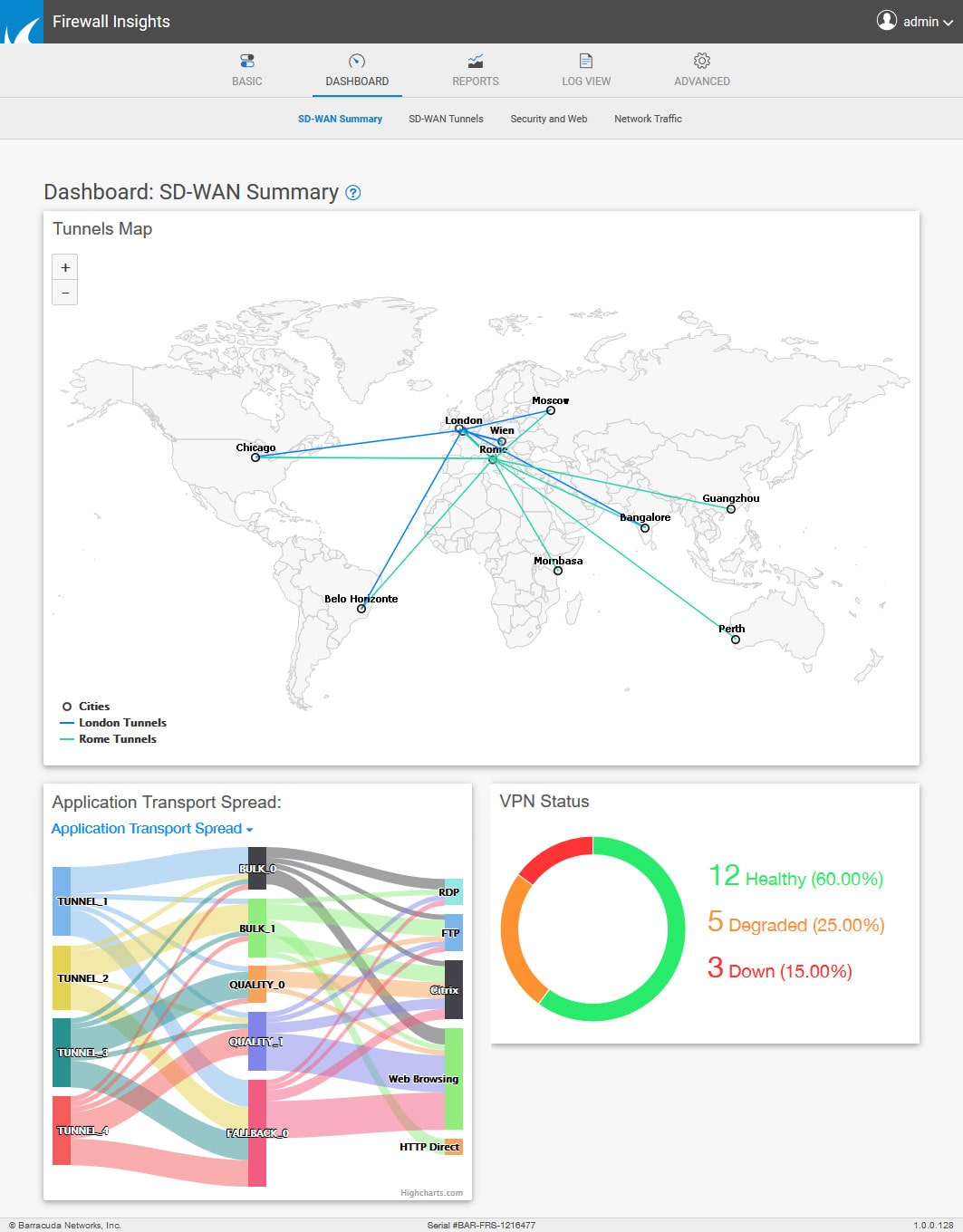
Barracuda Firewall Insights provides real-time dashboards for overall WAN status, SD-WAN tunnel details, security, and general network status. It delivers valuable insights by automatically analyzing real-time information and log streams from all Barracuda CloudGen Firewall appliances. This lets you respond rapidly and effectively to changing conditions in order to maintain optimal connectivity, security, and performance.
Technical Specs:
Available dashboards
- SD-WAN dashboard
- SD-WAN tunnel status dashboard
- Security and web traffic dashboard
- Network traffic dashboard
General report types
- Customizable reports
- On-demand reports
- Scheduled reports
- Administrative reports
- Advanced reports
- Predefined productivity reports
- Predefined web activity reports
- Predefined safety and liability reports
- Predefined network activity reports
- Predefined threat and security reports
- Predefined infection activity reports
- Predefined traffic reports
Report output formats
- HTML
- CSV
- Text
Report delivery options
- Externals server (FTP or SMB)
- Browser
Report specifics
- CloudGen Firewall dashboard
- Overview of allowed and blocked sessions along with an explanation
- Threats overview by user, source, and destination
- Web activity and productivity: Categories, users, and domains accessed by number of requests, bandwidth, and browse time
- Summary reports
- Safety and liability
- Network activity
- Threat summary
- Web traffic summary
- Total usage
- Safety and liability reports (based on user and requests)
- Traffic to adult-rated sites
- Anonymizer sites
- File-sharing and P2P
- Intolerance and hate
- Spyware
- Violence and terrorism
- Based on user and requests
- Security reports by subtype (based on user, time, source IP, and destination)
- ATP
- IPS
- Virus
- Malware
- Spyware
- Blocked file content
- Web activity reports for
- Accessed categories
- Browse time
- Domains
- Users
- Policy actions
- User agents based on time of day, sessions, bandwidth requests, source, and user
- Productivity reports on requests, bandwidth, and browse time for
- Gaming
- Streaming
- YouTube users by requests, bandwidth, and browse time
- OT, IIoT and SCADA reports
- Traffic summary
- Traffic per protocol
- SCADA traffic per hour or day (S7, DNP3, Modbus, IEC60870-5-104 traffic)
Deployment
Barracuda Firewall Insights is available as a virtual image for KVM, VMWare, and Hyper-V with the following requirements:
| REQUIREMENTS | |
|---|---|
| SSD data size | Unlimited (min. 2 TB) |
| RAM | Unlimited (min. 32 GB) |
| CPU cores | Unlimited (min. 8) |
| IOPS | Unlimited (min. 24,000) |
Documentation:
Download the Barracuda Firewall Insights Data Sheet (PDF)
List Price:
Our Price: $86.64
List Price:
Our Price: $102.60
List Price:
Our Price: $120.84
List Price:
Our Price: $171.00
List Price:
Our Price: $171.00
List Price:
Our Price: $281.58
List Price:
Our Price: $239.40
List Price:
Our Price: $327.18
List Price:
Our Price: $376.20
List Price:
Our Price: $490.20
List Price:
Our Price: $832.20
List Price:
Our Price: $1,197.00
List Price:
Our Price: $1,311.00
List Price:
Our Price: $1,710.00
List Price:
Our Price: $1,368.00
List Price:
Our Price: $2,337.00
List Price:
Our Price: $1,938.00
List Price:
Our Price: $2,736.00
List Price:
Our Price: $3,192.00
List Price:
Our Price: $2,736.00
List Price:
Our Price: $4,503.00
List Price:
Our Price: $5,244.00
List Price:
Our Price: $5,358.00
List Price:
Our Price: $7,467.00
List Price:
Our Price: $11,058.00
List Price:
Our Price: $13,452.00
List Price:
Our Price: $13,452.00
List Price:
Our Price: $2,394.00
List Price:
Our Price: $322.62
List Price:
Our Price: $615.60
List Price:
Our Price: $923.40
List Price:
Our Price: $1,710.00
List Price:
Our Price: $273.60
List Price:
Our Price: $513.00
List Price:
Our Price: $763.80
List Price:
Our Price: $1,482.00
List Price:
Our Price: $322.62
List Price:
Our Price: $615.60
List Price:
Our Price: $923.40
List Price:
Our Price: $1,710.00