
 WebEx
WebEx
#1 in Web Meetings and On-Demand Collaborative Applications
WebEx, a Cisco Systems, Inc. company, is the #1 provider of web meetings worldwide. With over 12,000 businesses using WebEx for online meetings and collaboration, you know you count on Webex to deliver.

Over 2,000,000 users use WebEx for online business!
Use genuine WebEx services to share, meet and access data online.
Get big business advantages with WebEx solutions - priced right for your small business.
Break through the traditional boundaries of your business. Use WebEx to accomplish more in less time, with fewer resources. Streamline your processes in marketing, sales, training, support, and other departments — and gain a strong competitive edge.
WebEx Products:

WebEx MeetMeNow: Online Meeting, Net Meeting and Web Conference Software
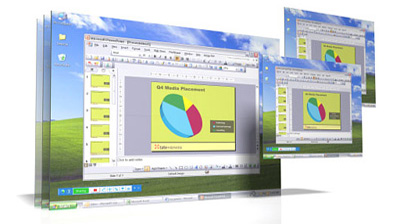
Get a quick and easy meeting solution for your personal use, with convenient credit card payment.
- Desktop Sharing & Control Granting
- Rich Annotation
- Integrated Audio (Included Free!)
- Private Chat
- Outlook and IM Integration
- Starting at just $49/mo
- Learn more..


WebEx PCNow: Remote PC Access & Remote Desktop Control; Access Your PC Anywhere
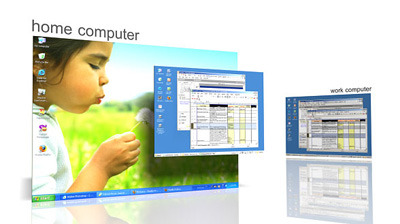
WebEx PCNow gives you instant access to your PC regardless of where you are - easily and securely.
- PC-to-PC and Mobile-to-PC Access
- Remote Desktop Control
- 128 Bit SSL Encryption
- Unique Security Features
- File Transfer
- Remote Printing
- Act Now! 2 PCs for just $14.00
- Learn more..

Products: In Depth:
WebEx MeetMeNow: Online Meeting, Net Meeting and Web Conference Software
Share and present online with anyone, anywhere. See how easy online meetings can be.
- Unlimited Meetings
- Low Flat Rate
- Share Your Entire Screen
- Web Conferencing - Made Easy!
- Phone Conferencing Included*
- From the Leader in Web Meetings!
Don't Be Boring: Get all the features you need to turn a boring conference call into a dynamic presentation. Share your desktop, annotate, chat and more! Have you ever been on a conference call and wished, "If I could just show them what's on my PC..."? With WebEx MeetMeNow, you can instantly share any application or content on your PC with up to 10 attendees, for one low monthly fee.
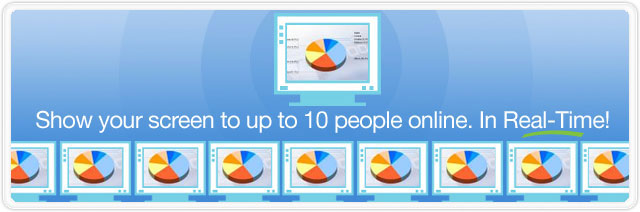
MeetMeNow integrates data and voice allowing you to instantly launch secure and reliable online meetings from your desktop, Outlook, or Instant Messenger service.
- Dynamic & Interactive: Just a click of your mouse starts a WebEx meeting - and it's just as easy to invite participants, demonstrate products and annotate documents.
- Demonstrate: Show PowerPoint presentations, highlight product features, and review contracts and documentation.
- Real-time Collaboration: Augment and complement face-to-face meetings with advanced online meeting capabilities.
- Hassle Free: Get the budget worked out, collaborate on presentation material, and communicate without the hassle or expense of traveling.
Addiitonal Features:
WebEx MeetMeNow gives you all the tools you need to host engaging meetings. Better still, when you choose Webex, you take advantage of the unparalleled technology, security, and reliability of the WebEx MediaTone™ Network.
- Desktop Sharing - Share your entire desktop in real-time. Your attendees will feel like they are in the same room as you.
- Control Granting - Pass control of your computer to any attendee and let them steer the meeting.
- Rich Annotation - Turn your desktop into a whiteboard and use interactive tools to convey your point.
- Integrated Audio (Included Free!) - Each meeting gets a special meeting number to call into. Control audio from within the meeting to mute & unmute attendees.
- Private Chat - Chat privately with someone during your meeting - even when sharing your desktop.
- Desktop, Outlook, and Instant Messenger Integration - Start and schedule meetings directly from your desktop, Outlook, Yahoo! and AIM - you can even jump directly into a meeting during chat.
Easy Access to Meeting Features: With the WebEx MeetMeNow Meeting control panel you'll have immediate access to all of the features you need to host effective online meetings, with fingertip ease.
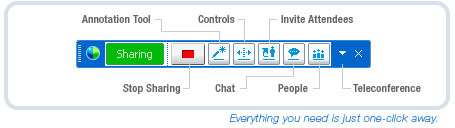
Seeing is believing! Sign up for a FREE WebEx MeetMeNow trial today!
WebEx PCNow: Remote PC Access & Remote Desktop Control; Access Your PC Anywhere
WebEx PCNow Increases productivity and brings flexibility to your work life by allowing you to access your Office PC from anywhere and from any device.
Work from home, access your office email from mobile phone, share files and folders with colleagues, share pictures with friends and family and do much more with WebEx PCNow.
How it Works:
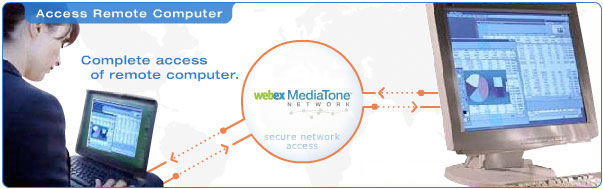
- Sign Up: Signing up is quick and easy. You'll get the first 30 days free, then as little as $5.99/month per PC will allow you to access and manage up to 10 remote PCs. You choose the plan that works for you.
- Set Up: After signing up you'll be walked through the set up process. The PCNow remote access agent will need to be installed on each of the PCs you plan to access remotely.
- Access: From any PC log in to pcnow.webex.com, click on the Computers tab, and choose the remote PC you'd like to connect to. It's that easy!
Additional Features:
 |
Remote Desktop Control Access your PCs using a standard web browser, and work as if you were sitting right there. No software is installed on your local computer or mobile device, and your data, emails and files are always accessible. The days of lugging your laptop around and forgetting documents are over. |
 |
Mobile Access to Your Files and Folders Access files, photos, and documents stored on your remote computer from any mobile phone. Quickly share documents and pictures on the go. |
 |
Mobile Organizer Access Outlook email, calendar and contacts from your mobile phone. Reply to emails, create appointments and quickly retrieve contact information when you need it. |
 |
Mobile Skype™ Call or chat with Skype contacts even on mobile devices that are not supported by Skype mobile client. International calls and conference calls cost just pennies per minute. |
 |
Mobile Search If you have Google, Yahoo, Windows, or X1 desktop search installed on your computer, you can search your desktop from any mobile phone. |
 |
Mobile Online Storage 100MBs of free online storage allows you to automatically store important files and access them even when your computer is off-line. Note: - Additional online storage will be available for purchase soon. |
 |
Copy and Paste Copy and paste text between computers - simply and easily. |
 |
Remote Printing Print any document on your remote computer to a local printer. Instantly obtain a hard copy of any document living on your remote computer. |
 |
File Transfer File Transfer Transfer files to and from your remote computer. If you travel and forget to bring a document, easily access your computer and transfer the file to your local computer. |
 |
128 Bit SSL All data transferred during a remote access session, from end to end, is totally secure and private. Work confidently, knowing that your data is secure, private and always available. |
 |
Remote Screen Blanking & Keyboard Locking Prevents anyone at the remote location from tampering with your computer during a session. Your privacy and your remote access session are protected. |
 |
Phone Authentication A unique option that triggers a phone call from the network, requiring that an access code be entered via the phone's keypad to obtain access to the remote computer. Provides extremely high security. |
 |
Usage Activity Reports View detailed records of your remote access sessions. Self service reporting at your fingertips. |