 Barracuda Networks Web Application Firewall Overview:
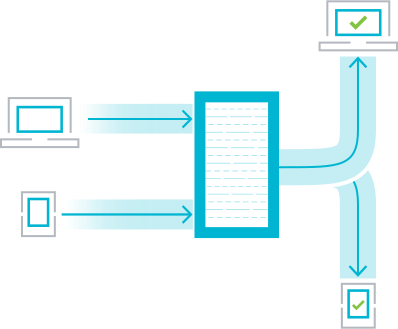
Barracuda Web Application Firewall blocks an ever-expanding list of sophisticated web-based intrusions and attacks that target the applications hosted on web servers and the sensitive or confidential data to which they have access. Placed between the Internet and web servers, Barracuda Web Application Firewall scans all inbound web traffic to block attacks, and scans outbound traffic to provide highly effective data loss prevention..
Barracuda Web Application Firewall simplifies application security so you can focus on your business. Its comprehensive feature set, versatile deployment options, and ease of use lets you automate many application security tasks, whether your web infrastructure lives on-site, in a virtualized environment, or in the cloud.
Application security made simple.
Deploy and configure quickly and easily—no steep learning curve or complicated certifications to obtain.
Agile friendly, DevOps ready.
Develop and deploy new or updated apps fast, thanks to its full Rest API.
Cloud native for modern workloads.
Seamlessly integrates with cloud-native services to provide security, control, and peace of mind.
Ensure protection from web attacks and DDoS.
Barracuda Web Application Firewall protects applications, APIs, and mobile app backends against a variety of attacks including the OWASP Top 10, zero-day threats, data leakage, and application-layer denial of service (DoS) attacks. By combining signature-based policies and positive security with robust anomaly-detection capabilities, Barracuda Web Application Firewall can defeat today’s most sophisticated attacks targeting your web applications.
Stop bad bots dead in their tracks.
Sophisticated malicious bots mimic human users to evade standard bot detection. However, blocking legitimate bots can harm your business. So modern bot defense has to both distinguish between legitimate and malicious bots, and between human users and advanced bots. Barracuda Web Application Firewall offers Advanced Bot Protection that uses machine learning to continually improve its ability to spot and block bad bots and human-mimicking bots — while allowing legitimate human and bot traffic to proceed with minimal impact.
Protect your APIs and mobile apps.
Modern applications are increasingly interconnected, exposing more APIs to attacks. Barracuda Web Application Firewall solutions protect your entire attack surface, including REST APIs and API-based applications. XML protection secures REST and WSDL interfaces against schema and WSDL poisoning. JSON protection scans payloads to ensure that only legitimate requests are allowed through. API Discovery features use your API definition files to automatically create the required rulesets for the API, reducing admin overhead.
Enable granular access control and secure app delivery.
To ensure that only authorized personnel can access your application backends and data, Barracuda Web Application Firewall solutions integrate with AD, LDAP, and RADIUS, giving you granular control over which users and groups can access what data. They also secure all the services that rely on ADFS. SAML support provides a seamless single-sign-on (SSO) experience across your on-premises and cloud-hosted applications. Two-factor authentication further enhances security through integrations with RSA SecureID, SMS PASSCODE, Duo, and others.
Automate and orchestrate security.
Barracuda Web Application Firewall integrates with many popular third-party DevOps tools to ensure CI/CD processes are fully automated. Full-featured REST API seamlessly integrates with Puppet, Chef, Ansible, Terraform, Azure ARM, AWS CloudFormation, and more. In addition, the content routing module further enables CI/CD rollout options such as blue-green deployments, canary rollouts and A/B testing. The Barracuda Web Application Firewall’s REST API is built on OpenAPI specifications, making it easy to create automation scripts, and the official GitHub page has code samples for popular platforms and use cases.
Gain deep visibility into attacks and traffic patterns.
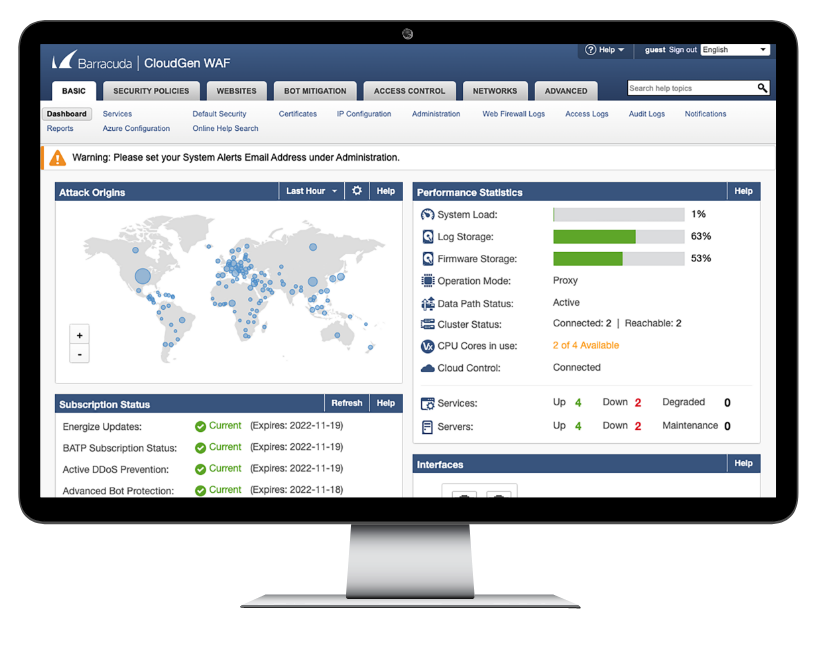
Barracuda Web Application Firewall features a detailed dashboard that presents vast amounts of data in the form of actionable insights that help you make informed decisions. System health and utilization, traffic patterns, subscription status, system performance, attack statistics and origin locations, and much more is layered into a streamlined dashboard that makes it all easy to interpret and use. Barracuda Web Application Firewall also supports many external SIEMs and log management tools such as Azure Sentinel, Loggly, Sumologic, HPE ARCsight, IBM QRadar, Splunk, and many more.

Ensure protection from web attacks and DDoS.

Stop bad bots dead in their tracks.

Protect your APIs and mobile apps.

Enable granular access control and secure app delivery.

Automate and orchestrate security.

Gain deep visibility into attacks and traffic patterns.
Features:
Protection against OWASP & zero-day attacks
Protect against all OWASP top 10 attacks, zero-day attacks, data leakage, and DDoS attacks. The layered traffic processing engine and Smart Signatures use fewer attack-detection signatures to detect and block web attacks, including zero-day attacks. Each Smart Signature can detect attacks found in 40 attack-specific signatures, reducing detection time and improving overall detection. Application Learning adds automated Positive Security, with the ability to enforce this security from the URL down to the parameter level.
Advanced Bot Protection
Barracuda Advanced Bot Protection uses cloud-based machine learning to stop bad bots, easily blocking automated spam, web and price scraping, inventory hoarding, account takeover attacks, and much more
API Protection
Barracuda Web Application Firewall protects XML and JSON REST APIs against all application attacks, including OWASP Top 10 API threats. API Discovery capabilities make it easy to configure protection and limit the chances for misconfiguration.
Server Cloaking
Often the first step of a targeted attack is to probe public-facing applications to learn about the underlying servers, databases, and operating systems. Cloaking prevents attack reconnaissance by suppressing server banners, error messages, HTTP headers, return codes, debug information, or backend IP addresses from leaking to a potential attacker.
URL Encryption
Encrypt URLs before they are sent to clients, and ensure the original URLs or the directory structure are never exposed externally to prying eyes*. End users of the web applications interact and navigate the site using only encrypted URLs, which are decrypted by the WAF. The decryption process immediately identifies URL query or parameter tampering, malicious content injection or blind forceful browsing attacks. *Models 660 and above
Geo-IP and IP Reputation Checking
Using client source addresses, organizations can control access to web resources. The Barracuda Web Application Firewall can control access based on GeoIP to limit access only to specified regions. It is also integrated with the Barracuda Reputational Database and can identify suspicious IP addresses, bots, TOR networks and other anonymous proxies that are often used by attackers to hide their identity and location. Once an IP address is identified as a risk, administrators have the ability to block, limit, throttle, or issue a CAPTCHA challenge before allowing access.
Malware Protection and Anti-Virus
Seamless integration with Barracuda Advanced Threat Protection (BATP) to provide security against advanced threats. Simply add BATP to the Barracuda WAF to block advanced zero-hour threats. By analyzing files in a CPU-emulation based sandbox, it can detect, and block malware embedded deep inside files uploaded to websites or web applications.
Multi-Protocol Support
In addition to HTTP and HTTPS traffic processing, Barracuda Web Application Firewall can also inspect FTP and FTPS traffic and can be configured to allow/deny specific FTP commands. It also provides inspection capabilities for application protocols like XML and JSON and can be configured to proxy HTTP2 as well as HTML5 websockets traffic.
Application DDoS Protection
Protect against advanced application-layer DDoS (SlowLoris, RUDY and Slow Read) attacks which are different from volumetric DDoS attacks with heuristic fingerprinting and IP reputation to identify real users from botnet. Secure against application DDoS using a variety of risk assessment techniques such as application-centric thresholds, protocol checks, session integrity, active and passive client challenges, historical client reputation block lists, geo-location, and anomalous idle-time detection.
Volumetric DDoS Protection
Volumetric DDoS attacks are on the rise because the computational resources that are available to attackers make it very easy to launch full scale attacks that can bring an entire network down. Many times, the entry point for these attacks are web sites of organizations that bear the brunt of the load. Barracuda WAF offers a subscription-based DDoS protection cloud service that scrubs traffic before it reaches the intended websites. This allows the cloud service to identify patterns of DDOS attacks in the connections and block them.
JSON Security
Mobile application and REST APIs today rely on JSON (JavaScript Object Notation) to transfer data. However, this opens a whole new attack surface which is often overlooked and hard to secure by traditional scan-testing or pen-testing approaches. The Barracuda Web Application Firewall secures the entire attack surface of mobile applications and REST APIs, filters malicious inputs in requests with JSON payloads, helps ensure API SLAs to partners, and provides anti-pharming protection from rogue consumers. Interactive web applications using JSON with AJAX are similarly protected.
XML Firewall
Applications that rely on XML can now be secured with an XML Firewall capability that secures applications against schema and WSDL poisoning, highly-nested elements, recursive parsing, and other XML-based attacks. This secures communications between client and application or between applications from different systems closing an often-overlooked attack vector.
Active Threat Intelligence
Real-time attacks need real-time responses. Barracuda Active Threat Intelligence collects threat data from a large, worldwide network of sensors and customer traffic. This data is processed using Machine Learning in near real-time and pushed out to connected units immediately, allowing for rapid detection of new threats and attackers.
Client-Side Protection
Attackers exploit third-party scripts to perform client-side digital skimming attacks, such as Magecart, to steal PII and financial data directly from the browser. These attacks are difficult to detect because these scripts are loaded directly by the browser and attackers are using sophisticated techniques to avoid detection with scanners and similar defensive methods. Barracuda Web Application Firewall offers Client-Side Protection, a feature that automates the CSP and SRI configuration, reducing admin overheads and configuration errors. In addition to these capabilities, the Barracuda Active Threat Intelligence layer provides visualization and reporting for these configurations, providing admins with deeper visibility into the usage of these scripts.
Specifications:
The Barracuda Web Application Firewall blocks an ever-expanding list of sophisticated web-based intrusions and attacks that target the applications hosted on web servers. Below are the hardware specifications for the Web Application Firewall.
| Features |
360 |
460 |
660 |
86X Series |
96X Series |
106X Series |
| OWASP Top 10 Web Application Security Risks Protection |
✓ |
✓ |
✓ |
✓ |
✓ |
✓ |
| Geo-IP and IP Reputation (including public proxies and Tor Nodes) |
✓ |
✓ |
✓ |
✓ |
✓ |
✓ |
| Smart Signatures |
✓ |
✓ |
✓ |
✓ |
✓ |
✓ |
| Outbound Data Theft Protection (CreditCards, SSN etc.) |
✓ |
✓ |
✓ |
✓ |
✓ |
✓ |
| Adaptive Profiling |
|
|
✓ |
✓ |
✓ |
✓ |
| Exception Heuristics |
✓ |
✓ |
✓ |
✓ |
✓ |
✓ |
| Auto-Configuration Engine (Requires ABP Subscription) |
✓ |
✓ |
✓ |
✓ |
✓ |
✓ |
| File Upload Control |
✓ |
✓ |
✓ |
✓ |
✓ |
✓ |
| File Upload Security (Anti-Virus and Advanced Threat Protection) (ATP requires subscription) |
|
|
✓ |
✓ |
✓ |
✓ |
| Website Cloaking |
✓ |
✓ |
✓ |
✓ |
✓ |
✓ |
| Protocol Checks for HTTP and HTTPS traffic |
✓ |
✓ |
✓ |
✓ |
✓ |
✓ |
| Granular per URL/parameter policies |
✓ |
✓ |
✓ |
✓ |
✓ |
✓ |
| Rate Control |
|
|
✓ |
✓ |
✓ |
✓ |
| Client-Side Protection (Requires ABP License) |
✓ |
✓ |
✓ |
✓ |
✓ |
✓ |
| Protection against OWASP Top 10 API Security Risks |
Partial |
Partial |
✓ |
✓ |
✓ |
✓ |
| API Security (JSON) |
✓ |
✓ |
✓ |
✓ |
✓ |
✓ |
| API Security (XML) |
|
|
✓ |
✓ |
✓ |
✓ |
| API Discovery (JSON) |
✓ |
✓ |
✓ |
✓ |
✓ |
✓ |
| API Discovery (XML) |
|
|
✓ |
✓ |
✓ |
✓ |
| Web Scraping Protection including Known Bot Database |
✓ |
✓ |
✓ |
✓ |
✓ |
✓ |
| Advanced Bot Protection with Cloudbased Maching Learning (Requires ABP Subscription) |
✓ |
✓ |
✓ |
✓ |
✓ |
✓ |
| Barracuda Active Threat Intelligence (Requires ABP Subscription) |
✓ |
✓ |
✓ |
✓ |
✓ |
✓ |
| Bot Spam Protection (Referrer and Comment Spam) |
✓ |
✓ |
✓ |
✓ |
✓ |
✓ |
| Form Spam Protection |
|
|
✓ |
✓ |
✓ |
✓ |
| Credential Stuffing and Spraying Protection (Requires ABP Subscription) |
|
|
✓ |
✓ |
✓ |
✓ |
| Brute Force Attack Protection |
✓ |
✓ |
✓ |
✓ |
✓ |
✓ |
| CAPTCHA Support (Internal, reCAPTCHA v2 & v3) |
✓ |
✓ |
✓ |
✓ |
✓ |
✓ |
| Volumetric DDoS Protection (Requires ADP Subscription) |
✓ |
✓ |
✓ |
✓ |
✓ |
✓ |
| Application DDoS Protection |
✓ |
✓ |
✓ |
✓ |
✓ |
✓ |
| Features |
360 |
460 |
660 |
86X Series |
96X Series |
106X Series |
| TLS/SSL Offloading |
✓ |
✓ |
✓ |
✓ |
✓ |
✓ |
| Load Balancing & Content Routing |
|
✓ |
✓ |
✓ |
✓ |
✓ |
| Network HSM Support |
|
|
✓ |
✓ |
✓ |
✓ |
| Dynamic URL Encryption |
|
|
✓ |
✓ |
✓ |
✓ |
| HTTP/1.0, HTTP/1.1, HTTP/2.0, WebSocket, FTP/S & IPv6 Support |
✓ |
✓ |
✓ |
✓ |
✓ |
✓ |
| Request and Response Control (URL Translation) |
✓ |
✓ |
✓ |
✓ |
✓ |
✓ |
| Website Translations |
|
✓ |
✓ |
✓ |
✓ |
✓ |
| Caching and Compression |
|
✓ |
✓ |
✓ |
✓ |
✓ |
| Local Users/Group (Internal LDAP),Client Certificates |
✓ |
✓ |
✓ |
✓ |
✓ |
✓ |
| LDAP/Active Directory, RADIUS, Kerberos v5, SMS Passcodes, Okta support |
|
✓ |
✓ |
✓ |
✓ |
✓ |
| SAML, Azure AD, Duo Support, RSA SecurID integration, OpenID Connect, JWT |
|
|
✓ |
✓ |
✓ |
✓ |
| Azure AD |
|
|
✓ |
✓ |
✓ |
✓ |
| Enable single and multi-domain SSO |
✓ |
✓ |
✓ |
✓ |
✓ |
✓ |
| Enable MFA with RADIUS/ LDAP-based services |
|
✓ |
✓ |
✓ |
✓ |
✓ |
| Barracuda Vulnerability Remediation Service |
✓ |
✓ |
✓ |
✓ |
✓ |
✓ |
| Virtual Patching support for 20+ vulnerability scanners |
✓ |
✓ |
✓ |
✓ |
✓ |
✓ |
| Onboard logging [Web Firewall Logs, Access Logs, Audit Logs, Network Firewall Logs and System Logs) |
✓ |
✓ |
✓ |
✓ |
✓ |
✓ |
| On-demand and scheduled reporting with 30+ OOTB reports |
✓ |
✓ |
✓ |
✓ |
✓ |
✓ |
| Syslog Export |
✓ |
✓ |
✓ |
✓ |
✓ |
✓ |
| SIEM/SOAR Support (Includes: Splunk, ARCsight, Azure Sentinel, RSA enVision, IBM Qradar, Symantec, Sumologic, Loggly, Azure Event Hub and more) |
✓ |
✓ |
✓ |
✓ |
✓ |
✓ |
| VLAN and NAT Support |
✓ |
✓ |
✓ |
✓ |
✓ |
✓ |
| Network ACL's |
✓ |
✓ |
✓ |
✓ |
✓ |
✓ |
| Advanced Routing |
|
|
✓ |
✓ |
✓ |
✓ |
| Multi-Port Hardware |
|
|
|
✓ |
✓ |
✓ |
| Link Bonding |
|
|
|
✓ |
✓ |
✓ |
| Active-Passive High Availability |
✓ |
✓ |
✓ |
✓ |
✓ |
✓ |
| Active-Active High Availability |
|
|
✓ |
✓ |
✓ |
✓ |
| Advanced Bot Protection |
✓ |
✓ |
✓ |
✓ |
✓ |
✓ |
| Active DDoS Prevention |
✓ |
✓ |
✓ |
✓ |
✓ |
✓ |
| Advanced Threat Protection |
|
|
✓ |
✓ |
✓ |
✓ |
| Features |
360 |
460 |
660 |
86X Series |
96X Series |
106X Series |
| Throughput |
25 Mbps |
50 Mbps |
200 Mbps |
1 Gbps |
1 Gbps |
1 Gbps |
| Max. Backend Servers (Recommended) |
5 |
10 |
25 |
150 |
150 |
150 |
| HTTP Transactions Per Second |
8000 |
15000 |
30000 |
90000 |
90000 |
90000 |
| HTTP Connections Per Second |
2000 |
3000 |
10000 |
16000 |
16000 |
16000 |
| HTTPS Transactions Per Second |
2500 |
4000 |
12000 |
30000 |
30000 |
30000 |
| Concurrent Connections |
90000 |
150000 |
500000 |
950000 |
950000 |
950000 |
| Form Factor |
1U-Mini |
1U-Mini |
1U |
1U |
1U |
1U |
| Dimensions (inch) WxDxH |
17.2 x 1.7 x 1.4 |
17.2 x 1.7 x 1.4 |
17.2 x 1.7 x 22.6 |
17.2 x 22.4 x 1.73 |
17.2 x 22.4 x 1.73 |
17.2 x 22.4 x 1.73 |
| Weight (lb) |
12 |
12 |
26 |
26.45 |
26.45 |
26.45 |
| ECC Memory |
|
|
|
Yes |
Yes |
Yes |
| Management Port |
10
100
1000 |
10
100
1000 |
10
100
1000 |
10
100
1000 |
10
100
1000 |
10
100
1000 |
| Ethernet Ports |
2 x 10/100 RJ45 with bypass |
|
|
|
|
|
| Gigabit Ethernet Ports |
|
2x 1G RJ45 with bypass |
2x 1G RJ45 with bypass |
8x 1G RJ45 |
8x 1G RJ45 with bypass |
8x 1G SFP (MM)with bypass |
| 10Gigabit Ethernet Ports |
1 |
1 |
1 |
2 |
2 |
2 |
| AC Input (Amps) |
1.2 |
1.4 |
1.8 |
4.2 |
4.2 |
4.2 |
| Throughput |
|
|
|
|
|
|
| Heat Output (BTU/Hr) |
490 |
575 |
740 |
967.78 |
967.78 |
1001.91 |
| Operating Temperature |
5°C-35°C (41°F-95°F) |
5°C-35°C (41°F-95°F) |
5°C-35°C (41°F-95°F) |
0 ~ 40°C ( 32 ~ 104°F ) |
0 ~ 40°C ( 32 ~ 104°F ) |
0 ~ 40°C ( 32 ~ 104°F ) |
| Operational Relative Humidity |
8% ~ 90% (noncondensing) |
8% ~ 90% (noncondensing) |
8% ~ 90% (noncondensing) |
10 ~ 85% relative humidity |
10 ~ 85% relative humidity |
10 ~ 85% relative humidity |
| Safety & EMC Certifications |
Available on Request |
Available on Request |
EN 60950 FCC, CE |
EN 60950 FCC, CE |
EN 60950 FCC, CE |
EN 60950 FCC, CE |
| Features |
960 |
961 |
962 |
1060 |
1061 |
1062 |
| Throughput |
5 Gbps |
5 Gbps |
5 Gbps |
10 Gbps |
10 Gbps |
10 Gbps |
| Max. Backend Servers (Recommended) |
300 |
300 |
300 |
600 |
600 |
600 |
| HTTP Transactions Per Second |
180000 |
180000 |
180000 |
190000 |
190000 |
190000 |
| HTTP Connections Per Second |
30000 |
30000 |
30000 |
70000 |
70000 |
70000 |
| HTTPS Transactions Per Second |
50000 |
50000 |
50000 |
70000 |
70000 |
70000 |
| Concurrent Connections |
1800000 |
1800000 |
1800000 |
2800000 |
2800000 |
2800000 |
| Form Factor |
1U |
1U |
1U |
2U |
2U |
2U |
| Dimensions (inch) WxDxH |
17.2 x 22.4 x 1.73 |
17.2 x 22.4 x 1.73 |
17.2 x 22.4 x 1.73 |
17.4 x 3.5 x 25.5 |
17.4 x 3.5 x 25.5 |
17.4 x 3.5 x 25.5 |
| Weight (lb) |
26.45 |
26.45 |
26.45 |
52 |
52 |
52 |
| ECC Memory |
Yes |
Yes |
Yes |
Yes |
Yes |
Yes |
| Management Port |
10
100
1000 |
10
100
1000 |
10
100
1000 |
10
100
1000 |
10
100
1000 |
10
100
1000 |
| Ethernet Ports |
|
|
|
|
|
|
| Gigabit Ethernet Ports |
8x 1G RJ45 |
8x 1G RJ45 with bypass |
8x 1G SFP (MM) with bypass |
16x 1G RJ45 |
8x 1G RJ45 with bypass |
8x 1G Fiber with bypass |
| 10Gigabit Ethernet Ports |
2x 10G RJ45 |
2x 10G RJ45 with bypass |
2x 10G SFP+ (MM) with bypass |
4x 10G RJ45 |
4x 10G RJ45 with bypass |
4x 10G Fiber with bypass |
| Power Supply |
2 |
2 |
2 |
2 |
2 |
2 |
| AC Input (Amps) |
4.2 |
4.2 |
4.2 |
5.4 |
5.4 |
5.4 |
| Heat Output (BTU/Hr) |
490 |
575 |
740 |
967.78 |
967.78 |
1001.91 |
| Operating Temperature |
5°C-35°C (41°F-95°F) |
5°C-35°C (41°F-95°F) |
5°C-35°C (41°F-95°F) |
0 ~ 40°C ( 32 ~ 104°F ) |
0 ~ 40°C ( 32 ~ 104°F ) |
0 ~ 40°C ( 32 ~ 104°F ) |
| Operational Relative Humidity |
8% ~ 90% (noncondensing) |
8% ~ 90% (noncondensing) |
8% ~ 90% (noncondensing) |
10 ~ 85% relative humidity |
10 ~ 85% relative humidity |
10 ~ 85% relative humidity |
| Safety & EMC Certifications |
Available on Request |
Available on Request |
EN 60950 FCC, CE |
EN 60950 FCC, CE |
EN 60950 FCC, CE |
EN 60950 FCC, CE |
Technical Specs
Management features
- Customizable role-based administration
- Vulnerability scanner integration
- Trusted host exception
- Rest API
- Custom templates
- Interactive and scheduled reports
Instant Replacement Service
- Replacement unit shipped next business day
- 24/7 technical support
- Hardware refresh every four years
Barracuda Energize Updates
- Standard technical support
- Firmware and capability updates as required
- Automatic application definitions updates
Views:
Front Panel
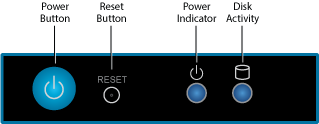
The following figure illustrates the Barracuda Web Application Firewall power and disk activity indicator lights for models 360:
Rear Panel Ports and Connectors
The following figure illustrates the Barracuda Web Application Firewall rear panel ports and connectors for models 360: