 Barracuda CloudGen Firewall F-Series Vx:
Enterprise networks grow larger and more complex every day - and more critical to key business operations. Barracuda CloudGen Firewall F-Series Vx is an essential tool to optimize the performance, security, and availability of today's dispersed enterprise WANs.
The Barracuda Advantage
- Effective WAN Management
- Application-based traffic prioritization across the WAN
- Intelligent uplink balancing
- Intelligent traffic reprioritization on uplink loss
- Enterprise Readiness
- Industry-leading centralized management
- WAN optimization
- Global WAN monitoring with Barracuda NG Earth
- Scalable Security
- Cloud Enablement and secure WAN Virtualization
- Drag-and-drop VPN graphical tunnel interface
Product Spotlight
- Powerful next-generation network firewall
- Advanced Threat Detection
- Built-in web security and IDS/IPS
- Dynamic mesh site-to-site VPN
- Client-to-Site VPN via browser (SSL VPN), mobile apps and desktop VPN clients
- Full application visibility and granular control
- Intelligent traffic regulation including
application-based provider selection
- Tightly integrated Quality of Service (QoS) and link balancing
- Centralized management of all functionality
- Template-based and role-based configuration
- Available for VMware, XenServer, KVM, and Hyper-V
 |
Integrated Next-Generation Security
Barracuda CloudGen Firewall F-Series Vx is designed and built from the ground up to provide comprehensive, nextgeneration firewall capabilities. Based on application visibility, user-identity awareness, intrusion prevention, and centralized management, the CloudGen Firewall F-Series Vx is the ideal solution for today’s dynamic enterprises as it is fully compatible with VMware, XenServer, KVM, and Hyper-V virtualization. |
 |
Regaining Control of User Activity
Barracuda CloudGen Firewall F-Series Vx restores control to networks made opaque and unmanageable by mobile devices at work, Web 2.0 applications, increasing dispersion, and the growing integration and dependence on cloudbased resources. It extends security coverage beyond network boundaries, and makes it easy to monitor and regulate everything the network and its users are doing |
 |
True Enterprise Readiness
Barracuda CloudGen Firewall F-Series Vx meets the enterprise requirements for massive scalability and efficient management across dispersed networks. Integrated WAN optimization and centralized management enable organizations to increase system availability while keeping administrative time and operation costs low.
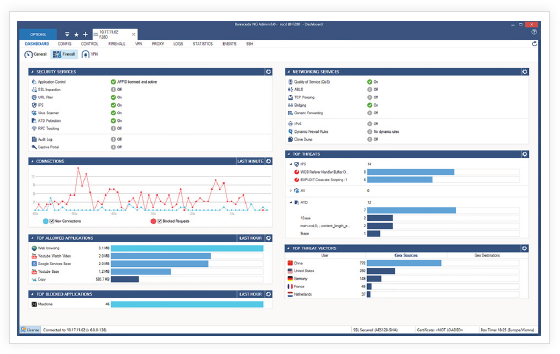
The Barracuda CloudGen Firewall dashboard provides real-time information and summaries of what is going on in an organization's network.
|
Improving Performance, Availability, and Security of Distributed Networks
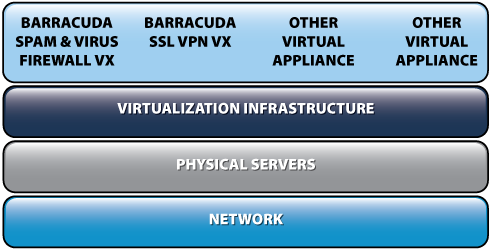
As organizations turn to virtualization as a way to save money, simplify deployments and reduce their environmental footprint, Barracuda Networks is offering virtual appliance versions of the Barracuda Spam & Virus Firewall and Barracuda SSL VPN with additional solutions to follow.
Virtual appliances enable enterprises to harness the same powerful security and networking technologies available in the Barracuda Networks range of hardware based solutions. Barracuda Networks virtual appliances are an ideal choice for enterprises that are standardizing hardware platforms or with existing virtual environments like VMware. As the organization grows, these appliances can be easily scaled for performance and capacity and also lend themselves to quicker backup and disaster recovery.
The virtual appliances combined with industry leading storage, security and networking hardware appliances from Barracuda Networks provide flexible deployment options to meet the unique needs of small, medium and large enterprises.
Cost Savings and Power Make this the Right Choice
More than a firewall, the Barracuda CloudGen Firewall Vx delivers the power of a network security gateway. This virtual solution replaces several essential network security and networking infrastructure components — cutting costs while streamlining architecture and management. By combining advanced perimeter and application security with advanced LAN and WAN management tools, the Barracuda CloudGen Firewall Vx provides a simplified, unified framework for managing total connectivity and security. Integrated with LDAP and Active Directory, the Barracuda CloudGen Firewall lets administrators create granular user-based policies across security, application and connectivity services with unrivaled ease and power.
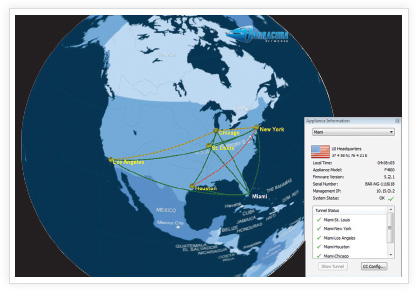 The Barracuda CloudGen Firewall Control Center provides centralized, real-time monitoring of all the firewalls across the enterprise.
Security
Integrating application and user awareness with an advanced network firewall, the Barracuda CloudGen Firewall Vx protects network layers 2 - 7. Deep packet inspection and behavioral analysis accurately detect threats and activity from over 800 applications and protocols. It also provides IPS, antivirus, antispam, NAC, DoS protection and web filtering for layered protection.
Connectivity
The Barracuda CloudGen Firewall Vx intelligently manages network links while also providing site-to-site VPNs and an SSL VPN for secure remote access. Its built in WAN optimization and uplink optimization capabilities prioritize important traffic while substantially reducing line cost.
Management
The Barracuda NextGen Control Center delivers instant information on system and security activity while keeping security and networking features quickly accessible. At a higher level, the Barracuda NextGen Control Center extends consistent policies and visibility of Barracuda CloudGen Firewall Vx's across the enterprise. With the NG Earth and the graphic tunnel editor GUIs, managing connectivity has never been more straightforward.
Easy to Use
Easy to remotely download and install in hosts around the world, Barracuda CloudGen Firewall Vx is fast and easy to deploy. The intuitive UI puts system information and powerful tools for LAN and WAN management as well as security at administrators' fingertips. Energize Updates automatically keep security subscriptions like IPS and web filter up to date.
Affordable
The Barracuda CloudGen Firewall Vx cuts costs several ways: It replaces several infrastructure components with one virtual appliance. Easy to manage, it keeps admin costs low. It lowers bandwidth costs by limiting bandwidth intense applications while using link aggregation with traffic shaping to further reduces bandwidth costs.
Benefits:
 Controlling Application Usage Controlling Application Usage
The Barracuda CloudGen Firewall gives administrators granular control over applications, allowing them to define rules for forwarding data traffic using the best respective transmission channels based on type of application, user, content, time of day, and geographical location. Mobile devices, online applications, social networks, and streaming media have caused an enormous increase in non-business network data traffic, pushing bandwidth capacities to their limits and causing degradation in performance of business-critical applications. The Barracuda CloudGen Firewall allows organizations to prioritize traffic by limiting or restricting access to non-business-related applications and network traffic, even when encrypted.
Key Features: Application-Based Link Selection, Application Control 2.0, Deep Application Context, Personalized Application Control, User Identity Awareness, Reporting |

Secure Your Network's Perimeter
Secure your organization's data against hackers, malware, DoS attacks, and botnets with Advanced Threat Detection. Traditionally, these threats would routinely bypass signature-based IPS and antivirus engines. Advanced Threat Detection stops threats in their tracks. You gain granular control backed by real-time, zero-hour threat intelligence, all from one single pane of glass that is easy to use and manage for the most advanced, up-to-the-minute security.
Key Features: Advanced Threat Detection, Malware Protection, Intrusion Detection and Prevention, Denial of Service (DoS) and Distributed Denial of Service (DDoS) Protection, Web Filtering |
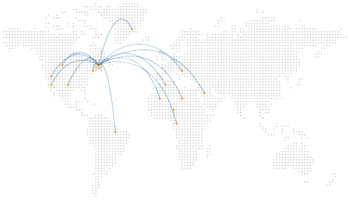 Cloud Enablement and WAN Virtualization Cloud Enablement and WAN Virtualization
One way to greatly increase the capacity of site-to-site links is to simply pay more for extra bandwidth. A better way is to take advantage of the Barracuda CloudGen Firewall's advanced WAN optimization and cloud-enablement capabilities.
Cloud offerings like Amazon EC2 and Windows Azure depend on highly secure environments within the cloud. The Barracuda CloudGen Firewall is ideal for securing use of these cloud services – connecting on-premises networks to the cloud and connecting logically separated components within the cloud datacenters.
Key Features: Application-Based Link Selection, Traffic Shaping and Quality of Service, Failover and Link Balancing, WAN Optimization, Windows Azure, Amazon EC2 |
Secure Remote Access and Access Control
The Barracuda CloudGen Firewall incorporates advanced site-to-site and client-to-site VPN capabilities, using both SSL and IPsec protocols to ensure remote users can easily and securely access network resources without time-consuming client configuration and management. The communication protocols used with our VPN clients has been optimized to be fully roaming-capable by quickly reconnecting upon loss of communication. Smart pathfinder technology determines the nearest point of entry to the corporate network. Advanced NAT traversal technology can use different encapsulation ports in either TCP or UDP and is able to mimic SSL to cut through intermittent proxies.
Key Features: BYOD (Bring Your Own Device), Secure Remote Access, Network Access Control, Mobile Portal
 Operations Cost Control Operations Cost Control
Maintaining and trouble-shooting security devices within enterprise networks can take a lot of time and IT resources. To mitigate operational costs, the Barracuda CloudGen Firewall provides advanced trouble-shooting and analysis through the intuitive web interface so that information such as activity history, complete logs, and graphical accounting can be obtained from powerful drill down views with just one click. Problem resolution times can be reduced from hours to just minutes.
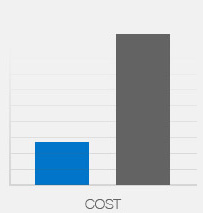
With affordable, all-inclusive pricing (no per-feature or per-user license fees), the Barracuda CloudGen Firewall can converge multiple point solutions into just one appliance to deliver impressive upfront and running cost savings. Ease of use keeps training and administrative costs low, while traffic intelligence and WAN optimization extend the capacity of existing infrastructure to deliver additional long-term direct cost savings.
Key Features: Scalable Deployment, Lifecycle Management, Revision Control System, Audit, and Reporting |
Features:
Advanced Threat Detection
While traditional solutions usually detect network threats after they have breached the network, by sending log notifications to the administrator, the Barracuda Advanced Threat Detection (ATD) implements full system emulation, which provides deep visibility into malware behavior. Files are checked against a cryptographic hash database that is constantly updated. In case the file is unknown, it is emulated in a virtual sandbox where malicious behavior can be discovered.
The Barracuda ATD offers Administrators granular, file-type-based control including automatic quarantine and blacklisting features to maintain the highest level of protection for an organization's network.
The Barracuda Advanced Threat Detection is an optional subscription.
Application Control 2.0
The Barracuda CloudGen Firewall provides a powerful and extremely reliable detection and classification of more than 1,200 applications and sub-applications by combining Deep Packet Inspection (DPI) and behavioral traffic analysis – no matter if the protocols are using advanced obfuscation, port hopping techniques, or encryption. It allows the creation of dynamic application policies and facilitates establishing and enforcing acceptable access and use policies for users and groups by application, application category, location, and time of day. Administrators can now:
- Block unwanted applications for certain users or groups
- Control and throttle acceptable traffic
- Preserve bandwidth and speed-up business-critical applications to ensure business continuity
- Enable or disable specific application sub-functions (e.g., Facebook Chat, YouTube Postings, or MSN file transfers)
- Intercept SSL-encrypted application traffic
The Barracuda CloudGen Firewall features advanced application-based routing path selection and Quality of Service (QoS) capabilities. These provide additional business value in addition to security by significantly improving network quality and availability, as well as reducing direct line cost due to bandwidth saved.
For rich reporting and drill-down capabilities, the Barracuda CloudGen Firewall comes with real-time and historical application visibility that shows application traffic on the corporate network, thus providing a basis for deciding which connections should be given bandwidth prioritization, crucial for QoS optimization for business-critical applications. Furthermore, it allows adjusting and refining the corporate application use policies.
Deep Application Context
The deep application context analysis allows for deeper inspection of the application data stream by continually evaluating the actual intention of applications and the respective users. By this means administrators can gain detailed insight into what a specific application was used for or if a user was trying to circumvent the corporate application usage policy.
Personalized Application Control
On top of the 1,400+ applications that are delivered out of the box and constantly updated, the Barracuda CloudGen Firewall provides a way to easily create user-defined application definitions for best-in-class application control customized and tailored to an organization's specific needs.
User Identity Awareness
Different network users may need different bandwidth-use rules. Most often, access to certain network resources is limited to certain users or user groups. Preferential allocation of more bandwidth to certain users or user groups and a limitation of available bandwidth for others is a common requirement. It requires the network device to know what user an IP actually belongs to. Barracuda CloudGen Firewalls are fully user-identity aware by linking a user to one or several IP addresses. Any role assignments that result from identity and device posture checks communicated to the firewall by our health agents can be used within the firewall to facilitate role-based access control (RBAC). Barracuda CloudGen Firewalls support authentication of users and enforcement of user-aware firewall rules, web filter settings, and Application Control 2.0 using Active Directory, NTLM, MS CHAP, RADIUS, RSA SecurID, LDAP/LDAPS, TACACS+, as well as authentication with x.509 certificates.
Reporting
The Barracuda NG Report Creator is a free tool that allows administrators to collect and consolidate traffic and application usage statistics from multiple Barracuda CloudGen Firewall units and to create easy-to-read reports in pdf format. Report tasks can be scheduled at various times during the day or week and distributed automatically via email. Besides predefined out-of-the-box reports such as Top Applications, Top Blocked URL Categories and Websites, Top Users by Bandwidth, as well as activity reports for specific users, the reporting engine provides customizable granular reports on user activity, activities during last day/week/month, etc.
For auditing reasons IP addresses can be anonymized.
Intrusion Detection and Prevention
The Barracuda CloudGen Firewall Intrusion Detection and Prevention System (IDS/IPS) strongly enhances network security by providing complete and comprehensive real-time network protection against a broad range of network threats, vulnerabilities, exploits, and exposures in operating systems, applications, and databases preventing network attacks such as:
- SQL injections and arbitrary code executions
- Access control attempts and privilege escalations
- Cross-Site Scripting and buffer overflows
- Denial of Service (DoS) and Distributed Denial of Service (DDoS) attacks
- Directory traversal and probing and scanning attempts
- Backdoor attacks, Trojans, rootkits, viruses, worms, and spyware
By providing advanced attack and threat protection features such as stream segmentation and packet anomaly protection, TCP split handshake protection, IP and RPC defragmentation, FTP evasion protection, as well as URL and HTML decoding, the Barracuda CloudGen Firewall is able to identify and block advanced evasion attempts and obfuscation techniques that are used by attackers to circumvent and trick traditional intrusion prevention systems.
As part of the Barracuda Energize Updates subscription, automatic signature updates are delivered on a regular schedule or on an emergency basis to ensure that the Barracuda CloudGen Firewall is constantly up-to-date. If the firewall unit is centrally managed, the pattern updates are conveniently distributed by the Barracuda NextGen Control Center.
Denial of Service (DoS) and Distributed Denial of Service (DDoS) Protection
In today’s world of omnipresent botnets, one of the main tasks of perimeter protection is to ensure ongoing availability of the network for legitimate requests and to detect and repel malicious denial of service attacks. With TCP SYN Flood Protection, the Barracuda CloudGen Firewall effectively functions as a generic TCP proxy, forwarding only legitimate TCP traffic to the inside of the network. Additionally, the Barracuda CloudGen Firewall allows the definition of a rate limit that is applied to the maximum number of sessions per source address to be handled by the firewall. Packets arriving at a rate faster than allowed will simply be dropped. In a massive DDoS attack, the attackers may simply aim for saturating the link by transmitting vast numbers of UDP packets. The integrated environmental monitoring feature of the Barracuda CloudGen Firewall diagnoses such conditions by link and target address monitoring. Once the response of a remote target address to regular ICMP probing fails, the system can be configured to activate different routes and uplinks (for example backup line, ISDN, xDSL). Using this feature, traffic will be unimpeded across unaffected lines and crucial site-to-site and site-to-Internet connectivity remains operational.
Web Filtering
The Barracuda Web Filter enables highly granular, real-time visibility into online activity, broken down by individual users and applications, letting administrators create and enforce effective Internet content and access policies. It protects user productivity, blocks malware downloads and other web-based threats, and enables compliance by blocking access to unwanted websites and servers, providing an important additional layer of security alongside application control.
Malware Protection
Barracuda Malware Protection shields the internal network from malicious content by scanning web content (HTTP and HTTPs), email (SMTP, POP3), and file transfers (FTP) via two fully integrated antivirus engines. Malware protection is based on regular signature updates as well as advanced heuristics to detect malware or other potentially unwanted programs even before signatures are available. Barracuda Malware Protection covers viruses, worms, trojans, malicious java applets, and programs using known exploits on PDF, picture and office documents, macro viruses, and many more, even when using stealth or morphing techniques for obfuscation.
Application-Based Link Selection
The combination of next-generation security and adaptive WAN routing allows the Barracuda CloudGen Firewall to dynamically assign available bandwidth for several links not only based on protocol, user, location, and content, but also based on applications, application categories and web filter categories. This keeps expensive, highly available lines free for business and mission-critical applications, while significantly reducing response times and freeing up additional bandwidth.
Traffic Shaping and Quality of Service
Limited network resources make bandwidth prioritization a necessity. The Barracuda CloudGen Firewall provides strong Quality of Service (QoS) that lets the administrator apply quality aspects and service guarantees to selected traffic flows within the WAN. QoS is often used to prioritize the network traffic of applications that are critical and must not be affected by the network traffic of other applications. The Barracuda CloudGen Firewall provides a large set of QoS techniques, such as traffic shaping, traffic prioritization, and bandwidth partitioning, which assigns a bandwidth limit to certain types of traffic. To select traffic for different priority classes, the available real-time traffic analysis can be used to identify whether network traffic was sent by business-critical applications or by potentially unwanted applications.
Failover and Link Balancing
To ensure the best and most cost-efficient connectivity, the Barracuda CloudGen Firewall provides a wide range of built-in uplink options such as unlimited leased lines, up to four xDSL uplinks, etc. By eliminating the need to purchase additional devices for link balancing, security conscious customers will have access to a WAN connection that never goes down, even if one or two of the existing WAN uplinks are severed. Further, traffic intelligence mechanisms make sure the next defined uplink is activated on the fly and all traffic is rerouted to make full use of the remaining lines. In the event that backup lines provide less bandwidth, intelligent traffic shaping automatically prioritizes business-critical applications, networks, or distinct endpoints.
WAN Optimization
The Barracuda CloudGen Firewall can significantly enhance the WAN performance of distributed network environments by improving availability, performance, and response time of business-critical applications by lowering throughput and transmission delays, affecting time-sensitive decisions and enterprise profitability. The next-generation networking concept of the Barracuda CloudGen Firewall provides a set of powerful features to efficiently reduce and offset the negative effects of high line latencies and response times. By implementing enterprise-grade WAN acceleration features such as data deduplication, traffic compression, and protocol optimization, the Barracuda CloudGen Firewall can significantly improve site-to-site WAN traffic and increase productivity by accelerating the delivery of business applications - at no extra charge. WAN traffic can be effectively compressed up to 95 percent, significantly reducing the bandwidth needed at remote locations while increasing network responsiveness.
Microsoft Azure
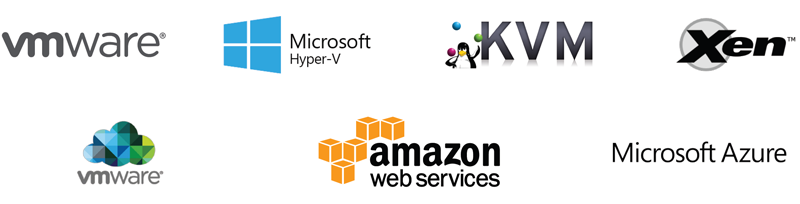
Besides VMware, KVM, and XenServer, the Barracuda CloudGen Firewall is fully compatible for use in Windows Azure for establishing site-to-site and/or client-to-site connections to Azure and creating a DMZ in Azure to implement an additional high-security layer.
As organizations have adopted virtualization for their server infrastructures, there has been a corresponding trend to extend the benefits of virtualization to the security layer. Barracuda’s award-winning security solutions are available as virtual appliances to help organizations.
Barracuda CloudGen Firewall virtual appliances are complete solutions, eliminating the need for installing, configuring, and integrating disparate operating systems, databases, system management, and application software. In addition, Barracuda virtual appliances come “locked down” from a security perspective, built from the ground up on the Barracuda OS, a hardened Linux operating kernel and optimized to run seamlessly within virtualized environments.
Amazon EC2
Besides VMware, KVM, and XenServer, the Barracuda CloudGen Firewall is fully compatible for use in Amazon Elastic Compute Cloud (EC2).
As organizations have adopted virtualization for their server infrastructures, there has been a corresponding trend to extend the benefits of virtualization to the security layer. Barracuda’s award-winning security solutions are available as virtual appliances.
Barracuda CloudGen Firewall virtual appliances are complete solutions, eliminating the need for installing, configuring and integrating disparate operating systems, databases, system management, and application software. In addition, Barracuda Networks virtual appliances come “locked down” from a security perspective, built from the ground up on the Barracuda OS, a hardened Linux operating kernel and optimized to run seamlessly within virtualization environments.
BYOD (Bring Your Own Device)
The influx of private computing devices, from smartphones to laptops and tablets, into the workplace may help increase productivity, flexibility, and convenience. However, BYOD adds new security challenges and risks, such as enabling and controlling access, as well as preventing data loss. The Barracuda CloudGen Firewall provides strong capabilities to give users the full advantage of their devices while reducing possible risks to the business. Unwanted applications can be blocked, LAN segmentation can protect sensitive data, and network access control can check the health state of each device connecting to the corporate network.
Secure Remote Access
The Barracuda CloudGen Firewall incorporates advanced site-to-site and client-to-site VPN capabilities, using both SSL and IPsec protocols to ensure remote users can easily and securely access network resources without complex client configuration and management. Every Barracuda CloudGen Firewall unit supports an unlimited number of VPN clients at no extra cost. The Barracuda VPN client also provides the ability to enforce Windows Security Center settings on client machines running Windows. This allows administrators to centrally enforce the usage of Windows Security settings on PCs. The enforced policies can include enabling the Microsoft Network Firewall, Windows Updates, Windows Virus Protection, Windows Spyware Protection, and Internet Security Settings.
Barracuda VPN Clients are available for Microsoft Windows, Mac OS, and various Linux systems.
Network Access Control
The optional Barracuda CloudGen Firewall SSL VPN and NAC subscription adds a customizable and easy-to-use portal-based SSL VPN as well as sophisticated Network Access Control (NAC) functionality.
The Barracuda Network Access Client, when used with the Barracuda CloudGen Firewall, provides centrally managed Network Access Control (NAC) and an advanced personal firewall. This allows enforcement of minimum Windows client security prerequisites before being allowed access to the network or access to a quarantine network. Security posture can be specified according to available Windows patch level, availability of antivirus and/or anti-spyware, and user ID. Access restrictions are enforced locally on the client by the centrally managed personal Windows firewall as well as at the gateway. Using existing Barracuda CloudGen Firewall appliances, Barracuda Networks offers a ready-to-use Network Access Control framework without expensive investments into the basic network infrastructure. All Barracuda Network Access Clients as well as all Barracuda CloudGen Firewall units acting as policy servers can be administered, monitored, and reviewed from a single Barracuda NextGen Control Center.
Scalable Deployment
Managing the security issues in a widely distributed enterprise network can be painful and extremely time-consuming. Managing a system may take only 15 minutes per day. But having 20 firewall systems in place results in five hours per day – just to manage the existing system. With the Barracuda NextGen Control Center, managing mulitple Barracuda CloudGen Firewalls takes the same amount of time as managing one.
- Create pre-configured templates for easy-rollout.
- Have all information about the enterprise security deployment available in real time.
- Create reports of either one or all Barracuda CloudGen Firewalls.
Lifecycle Management
Scalable Barracuda CloudGen Firewalls offer companies sustainable investment protection. Energize Updates automatically provide the latest firmware and threat definitions to keep the appliance up to date. With a maintained Instant Replacement subscription, organizations receive a new appliance with the latest specs every four years.
Revision Control System, Audit, and Reporting
The integrated revision control system increases auditing ease for the infrastructure and cuts overhead.
Additionally, the revision control system for all changes provides compliance with governmental and company policy requirements.
Comprehensive reporting makes bandwidth usage and all other security-related information visible, reportable, and easy to read.
Mobile Portal
Gain easy access to your organization’s applications via SSL VPN connections. Barracuda‘s Mobile Portal enables you to set up shortcuts on the home screen of devices such as smartphones or tablets. When accessing the portal via the web browser on a mobile device, users can browse apps, network folders and files as if they were connected to the office network.
The Mobile Portal supports most commonly used devices, e.g., Apple iOS, Android, and Blackberry devices.
Barracuda’s Mobile Portal is an optional feature included with an “NG SSL VPN and NAC” subscription.
Model Comparison:
| NGF Vx Editions1 |
VF10 |
VF25 |
VF50 |
VF100 |
VF250 |
VF500 |
VF1000 |
VF2000 |
VF4000 |
VF8000 |
| Number of IPs |
10 |
25 |
50 |
100 |
250 |
500 |
Unlimited |
Unlimited |
Unlimited |
Unlimited |
| Allowed Cores |
1 |
2 |
2 |
2 |
2 |
2 |
2 |
4 |
8 |
16 |
| Application Control2 |
|
|
|
|
|
|
|
|
|
|
| IPS2 |
|
|
|
|
|
|
|
|
|
|
| Dynamic Routing |
|
|
|
|
|
|
|
|
|
|
| App-based Provider Selection |
|
|
|
|
|
|
|
|
|
|
| VPN3 |
|
|
|
|
|
|
|
|
|
|
| SSL Interception |
|
|
|
|
|
|
|
|
|
|
| WAN Optimization |
|
|
|
|
|
|
|
|
|
|
| Web Filter |
|
|
|
|
|
|
|
|
|
|
| Mail Gateway & Spam Filter |
|
|
|
|
|
|
|
|
|
|
| Malware Protection4 |
|
Optional |
Optional |
Optional |
Optional |
Optional |
Optional |
Optional |
Optional |
Optional |
| Advanced Threat Detection4, 5 |
|
Optional |
Optional |
Optional |
Optional |
Optional |
Optional |
Optional |
Optional |
Optional |
| Premium Remote Access |
|
Optional |
Optional |
Optional |
Optional |
Optional |
Optional |
Optional |
Optional |
Optional |
1 The Barracuda CloudGen Firewall F-Series Vx virtual image covers all editions.
2 Requires a valid Energize Updates subscription
3 Barracuda CloudGen Firewall F-Series Vx editions include as many VPN licenses as the number of protected IPs. VPN clients with an active connection to the Barracuda CloudGen Firewall F-Series Vx are counted towards the protected IP limits.
4 Including FTP, mail and Web protocols
5 Requires Malware Protection subscription.
Technical Specs

Firewall
- Stateful packet inspection and forwarding
- Full user-identity awareness
- Intrusion Detection and Prevention System (IDS/IPS)
- Application control and granular application enforcement
- Interception and decryption of SSL/TLS encrypted applications
- Antivirus and web filtering in single pass mode
- SafeSearch enforcement
- Google Accounts Enforcement
- Denial of Service protection (DoS/DDoS)
- Spoofing and flooding protection
- ARP spoofing and trashing protection
- DNS reputation filtering
- TCP stream reassembly
- Transparent proxying (TCP)
- NAT (SNAT, DNAT), PAT
- Dynamic rules / timer triggers
- Single object-oriented rule set for routing, bridging, and routed bridging
- Virtual rule test environment

Hypervisor Support
- VMware
- XenServer
- Hyper-V
- KVM

User Identity Awareness
- Terminal Server Agent
- Domain Controller Agent
- Authentication – supports x.509, NTLM,
RADIUS, RSA SecurID, LDAP/LDAPS,
Active Directory, TACACS+, SMS Passcode
(VPN), local authentication database

Intrusion Detection & Prevention
- Protection against exploits, threats, and vulnerabilities
- Packet anomaly and fragmentation protection
- Advanced anti-evasion and obfuscation techniques
- Automatic signature updates

Traffic Optimization
- Link monitoring, aggregation, and failover
- Dynamic routing
- Application-based provider selection
- Traffic shaping and QoS
- On-the-fly flow reprioritization
- Stream and packet compression
- Byte-level data deduplication
- Protocol optimization (SMBv2)

Advanced Threat Detection
- Dynamic, on-demand analysis of
malware programs (sandboxing)
- Dynamic analysis of documents with
embedded exploits (PDF, Office, etc.)
- Detailed forensics for both, malware
binaries and web threats (exploits)
- Support for multiple operating
systems (Windows, Android, etc.)
- Flexible malware analysis in the cloud

Virtual Appliance
- Supports VMware and XenServer

VPN
- Drag & drop VPN tunnel configuration
- Secure site-to-site, client-to-site VPN
- Dynamic mesh site-to-site VPN
- Supports AES-128/256, 3DES, DES, Blowfish, CAST, null ciphers
- Private CA or external PKI
- VPNC certified (basic interoperability)
- Application-aware traffic routing
- IPsec VPN / SSL VPN / TINA VPN/ L2TP / PPTP
- Network Access Control
- iOS and Android mobile device VPN support

High Availability
- Active-active† or active-passive
- Network notification of failover
- Transparent failover without session loss
- Encrypted HA communication

Infrastructure Services
- DHCP server, relay
- SIP, HTTP, SSH, FTP proxies
- SNMP and IPFIX support
- DNS Cache
- SMTP gateway and SPAM filter

Protocol Support
- IPv4, ARP, IPv6
- BGP/OSPF/RIP
- VoIP (H.323, SIP, SCCP [skinny])
- RPC protocols (ONC-RPC, DCE-RPC)
- 802.1q VLAN
Support Options

Barracuda Energize Updates
- Standard technical support
- Firmware updates
- Layer 7 application definitions for control of more than 800 applications
- IPS pattern updates
Security Options
- Advanced Threat Detection
- Malware Protection
- Premium Remote Access subscription provides remote access via the CudaLaunch App for Windows, Mac OS X, iOS and Android devices
Central Management Options
- Barracuda NextGen Control Center
– Unlimited firewalls
– Support for multi-tenancy
– Multi-administrator support & RCS
Deployment:
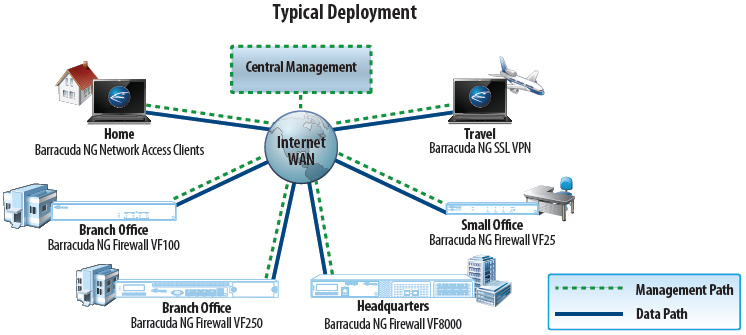
The Barracuda CloudGen Firewall Vx offers comprehensive protection of distributed networks through a combination of hardware and virtual appliances at each office location and comprehensive VPN access options for remote users.
To centralize management across many different firewalls and remote access users, the Barracuda NextGen Control Center enables administrators to configure security and network access policies, control firmware update revisions, and manage user settings. Template-based configuration and globally available security objects enable efficient configuration across thousands of locations.
Barracuda CloudGen Firewall Vx are available for locations of all sizes, ranging from the very small remote location to the headquarters or even data center.
For on the go users, the Barracuda NG Network Access Clients provide secure and convenient VPN access to the network. For internet kiosks or home computers where client software deployment is not appropriate, the Barracuda NG SSL VPN & NAC option provides secure access to vital network resources from any Web browser.
CloudGen Firewall Technology:
Secure Your Networks Perimeter
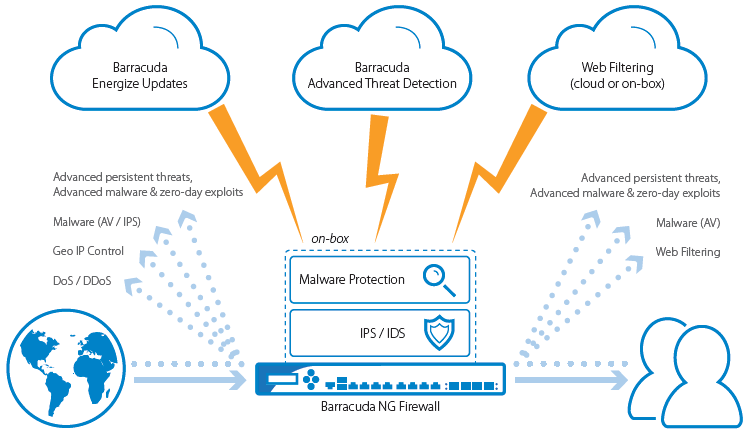
Barracuda CloudGen Firewall provides several layers to protect an organization's network
Intrusion Detection and Prevention
Barracuda NG Intrusion Detection and Prevention System (IDS/IPS) strongly enhances network security by providing complete and comprehensive real-time network protection against a broad range of network threats, vulnerabilities, exploits, and exposures in operating systems, applications, and databases preventing network attacks such as:
- SQL injections and arbitrary code executions
- Access control attempts and privilege escalations
- Cross-Site Scripting and buffer overflows
- DoS and DDoS attacks
- Directory traversal and probing and scanning attempts
- Backdoor attacks, trojans, rootkits, viruses, worms, and spyware
By providing advanced attack and threat protection features such as stream segmentation and packet anomaly protection, TCP split handshake protection, IP and RPC defragmentation, FTP evasion protection, as well as URL and HTML decoding, Barracuda CloudGen Firewall is able to identify and block advanced evasion attempts and obfuscation techniques that are used by attackers to circumvent and trick traditional intrusion prevention systems.
As part of the Barracuda Energize Updates subscription, automatic signature updates are delivered on a regular schedule or on an emergency basis to ensure that Barracuda CloudGen Firewall is constantly up-to-date. If the firewall unit is centrally managed, the pattern updates are conveniently distributed by the Barracuda NextGen Control Center.
Malware Protection
Barracuda Malware Protection shields the internal network from malicious content by scanning web content (HTTP and HTTPs), email (SMTP, POP3), and file transfers (FTP) via two fully integrated antivirus engines. Malware protection is based on regular signature updates as well as advanced heuristics to detect malware or other potentially unwanted programs even before signatures are available.
Barracuda Malware Protection covers viruses, worms, trojans, malicious java applets, and programs using known exploits on PDF, pictures and office documents, macro viruses, and many more, even when using stealth or morphing techniques for obfuscation.
Advanced Threat Detection
Barracuda Advanced Threat Detection (ATD) uses next-generation sandbox technology powered by full-system emulation to catch not only persistent threats and zero-day exploits, but also advanced malware designed to evade detection. Files are forwarded to a cloud-based sandbox environment, where they are executed and analyzed to identify suspicious and malicious behavior.
Barracuda ensures flexible and simple deployment with your existing network infrastructure—no additional hardware is required since resource intensive sandboxing is offloaded to the cloud. The cloud database is continuously updated by all Barracuda CloudGen Firewalls with enabled ATD and, thereby, speed up the processing of already known files.
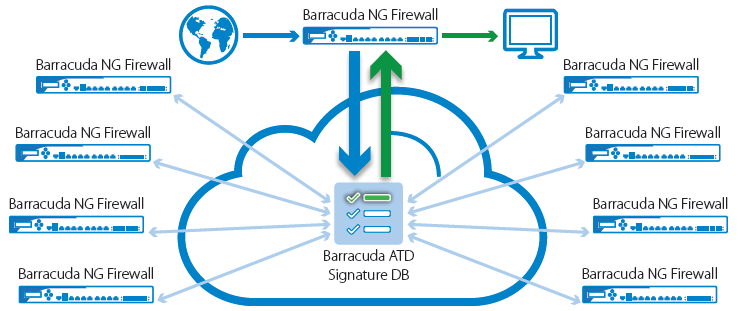
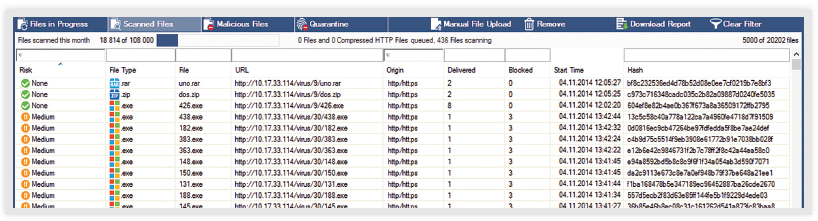
The administrator has full policy control over how PDF documents, Microsoft Office Files, EXEs/MSIs/DLLs, Android APKs, compressed files and archives are emulated and delivered to the client. Based on identified malware activity, infected users can be automatically quarantined preventing the malware from spreading within the network.
Customizable, on-demand analysis reports for any emulated file provide full insight and details on malicious activities, file behavior, system-registry entries, evasion and obfuscation techniques. This also enables network activities such as establishing encrypted connections to Botnet Command and Control Centers for increased security posture to evade scaled Botnet attacks.
Web Filtering
The web filtering options for the Barracuda CloudGen Firewall options enable highly granular, real-time visibility into online activity, broken down by individual users and applications, letting administrators create and enforce effective Internet content and access policies. It protects user productivity, blocks malware downloads and other web-based threats, and enables compliance by blocking access to unwanted websites and servers, providing an important additional layer of security alongside application control.
- Barracuda Web Filter offers online URL categorization (requires a valid Energize Updates subscription).
- Barracuda Web Filter can be operated in online and offline mode (available as a separate subscription)
Controlling Application Usage
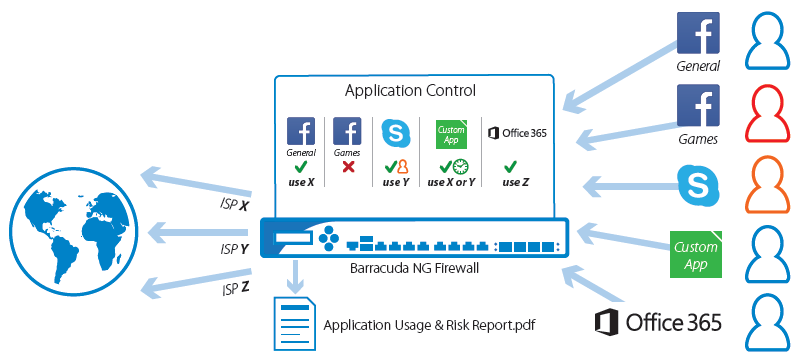
Block unwanted applications, control acceptable traffic, and ensure business continuity
Application Control
Barracuda CloudGen Firewall provides a powerful and extremely reliable detection and classification of more than 1,400 applications and sub-applications by combining Deep Packet Inspection (DPI) and behavioral traffic analysis – no matter if the protocols are using advanced obfuscation, port hopping techniques, or encryption. It allows the creation of dynamic application policies and facilitates establishing and enforcing acceptable access and use policies for users and groups by application, application category, location, and time of day. Barracuda CloudGen Firewall combines its application control with the seamless integration of authentication schemes like Active Directory, LDAP/S, NTLM, etc. As a consequence, an administrator is always on top of what the users to on the organization's network. Barracuda CloudGen Firewall features advanced application-based routing path selection and Quality of Service (QoS) capabilities. These provide additional business value in addition to security by significantly improving network quality and availability, as well as reducing direct line cost due to bandwidth saved.
For rich reporting and drill-down capabilities, Barracuda CloudGen Firewall comes with real-time and historical application visibility that shows application traffic on the corporate network, thus providing a basis for deciding which connections should be given bandwidth prioritization, crucial to QoS optimization for business-critical applications. Furthermore, it allows adjusting and refining the corporate application use policies.
Personalized Application Control
On top of the 1,400+ applications that are delivered out of the box and constantly updated, Barracuda CloudGen Firewall provides a way to easily create user-defined application definitions for best-in-class application control customized and tailored to an organization's specific needs.
Application-Based Provider Selection
The combination of next-generation security and adaptive WAN routing allows Barracuda CloudGen Firewall to dynamically assign available bandwidth for several links not only based on protocol, user, location, and content, but also based on applications, application categories, and web filter categories. This keeps expensive, highly available lines free for business and missioncritical applications, while significantly reducing response times and freeing up additional bandwidth.
 Deep Application Context
The deep application context analysis allows for deeper inspection of the application data stream by continually evaluating the actual intention of applications and the respective users. By this means administrators can gain detailed insight into what a specific application was used for or if a user was trying to circumvent the corporate application usage policy.
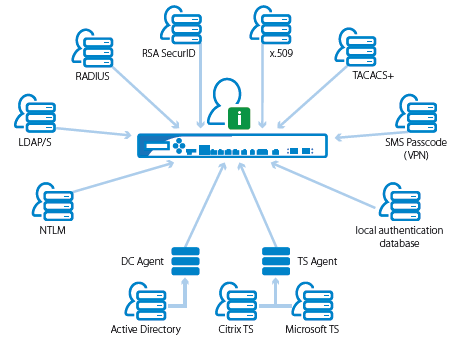
User Identity Awareness & Control
Barracuda CloudGen Firewall supports authentication of users and enforcement of user-aware firewall rules, web filter settings, and application control by seamlessly integrating with
- Microsoft and Citrix terminal service environments
- Microsoft Active Directory
- NTLM
- RADIUS
- RSA SecurID
- LDAP/LDAPS
- TACACS+
- and more...
Application Risk and Usage Report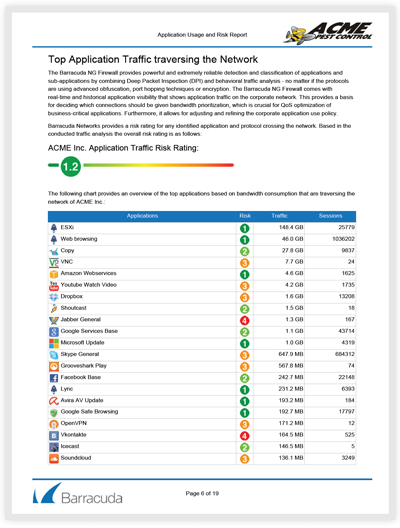
The Application Usage and Risk Report is a predefined report type in the Barracuda Report Creator tool providing automated reports and risk analysis based on the network traffic that is traversing the network. It provides an overview on how effective the currently deployed technologies are in detecting and enforcing the corporate application usage policies and gives recommendations what should be taken into account when redefining these policies. For collecting the traffic required for this report, Barracuda offers two different approaches:
- Layer2 Bridging
- SPAN Port / Port Mirroring
In either way, collecting the traffic has no impact on the firewall performance at all. The report creation can be started manually (on-demand) or scheduled (including automated email distribution). And - of course - this report is fully customizable to comply with possible branding requirements.
Cloud Enablement & WAN Virtualization
Today's corporate networks are being transformed by the proliferation of mobile devices and the increasing adoption of SaaS offerings like Microsoft's Office 365 and moving corporate services to private or public clouds.
The net result of this is increased dispersion or fragmentation of corporate network into multiple dislocated segments and a massively increased attack surface. In this scenario a firewall solution is needed that can be deployed to multiple locations on the network with the corresponding next-generation deep inspection features to mitigate attacks. The introduction of, e.g., Office 365 all of a sudden creates a need for direct internet break outs at multiple branch office locations. Thus multiple enforcement points need to be created. Business critical internal traffic running across the WAN links must be protected against outages as well as quality of service impairments due to aggressive but less important network activities on the same physical infrastructure.
Multiple Barracuda CloudGen Firewalls deployed to multiple physical and cloud locations allow an organization to span a highly performant and secure logical application delivery network (ADN) on top of the physical and virtualized infrastructure components. In conjunction with our leading central management concepts both the initial implementation and subsequent life cycle management tasks around the AND can be accomplished a surprisingly low total cost.
The key feature here is that full next-gen deep inspection can be combined with smart policy based adaptive traffic management. Policy based means that applicable QoS settings (bandwidth guarantees, priorities), network path selection, e.g., MPLS vs VPN, and/or privacy requirements can be based on the application or the person/groups causing the traffic. Adaptive means that failover policies can be defined that make sure that in case of unavailability of a particular path available alternative paths can be utilized. This feature allows for improved fault tolerance against outages as well for cost optimization strategies where multiple carriers/ISPs are combined to get the required bandwidth at an optimum price point.
Public cloud offerings like Amazon EC2 and Microsoft Azure are a new and increasingly attractive way to lower cost around IT operations. The business lines profit from a faster-timeto- market, good compute elasticity and an easy option to achieve global service availability quickly. There are challenges too. Replication typical on-premises DC concepts in these environments is impossible without a cloud compatible firewall product.
The Barracuda CloudGen Firewall is ideal for securing and compartmentalizing these public cloud environments – connecting on-premises networks to the cloud and connecting logically separated components within the cloud data centers.
Application-Based Provider Selection
But before an organization can benefit of the cloud, it is mandatory to get to the cloud!
As mentioned earlier, Barracuda CloudGen Firewall includes information on application, application categories, as well as web filter categories into its link selection policy. Such link policies can force for instance business critical traffic to use T1 lines whereas uncritical bulk traffic is routed via less expensive lines.
Traffic Shaping and Quality of Service
Limited network resources make bandwidth prioritization a necessity. Barracuda CloudGen Firewall provides strong Quality of Service (QoS) that lets the administrator apply quality aspects and service guarantees to selected traffic flows within the WAN. QoS is often used to prioritize the network traffic of applications that are critical and must not be affected by the network traffic of other applications. Barracuda CloudGen Firewall provides a large set of QoS techniques, such as traffic shaping, on-the-fly traffic prioritization, and bandwidth partitioning, which assigns a bandwidth limit to certain types of traffic. To select traffic for different priority classes, the available real-time traffic analysis can be used to identify whether network traffic was sent by business-critical applications or by potentially unwanted applications.
Failover and Link Balancing
To ensure the best and most cost-efficient connectivity, Barracuda CloudGen Firewall provides a wide range of built-in uplink options such as unlimited leased lines, up to four uplinks, etc. By eliminating the need to purchase additional devices for link balancing, security conscious customers will have access to a WAN connection that never goes down, even if one or two of the existing WAN uplinks are severed. Further, traffic intelligence mechanisms make sure the next defined uplink is activated on the fly and all traffic is rerouted to make full use of the remaining lines. In the event that backup lines provide less bandwidth, intelligent traffic shaping automatically prioritizes businesscritical applications, networks, or distinct endpoints.
Dynamic Mesh VPN
Simply by defining which deployments may create dynamic site-to-site VPN connections and, thereby, ensure business and communication continuity via low latency VPN connections.
WAN Optimization
Barracuda CloudGen Firewall can significantly enhance the WAN performance of distributed network environments by improving availability, performance, and response time of businesscritical applications by lowering throughput and transmission delays, affecting time-sensitive decisions and enterprise profitability. The next-generation networking concept of Barracuda CloudGen Firewall provides a set of powerful features to efficiently reduce and offset the negative effects of high line latencies and response times. By implementing enterprisegrade WAN acceleration features such as data deduplication, traffic compression, and protocol optimization, Barracuda CloudGen Firewall can significantly improve site-to-site WAN traffic and increase productivity by accelerating the delivery of business applications - at no extra charge. WAN traffic can be effectively compressed up to 95 percent, significantly reducing the bandwidth needed at remote locations while increasing network responsiveness.
Supported Virtualization and Public Cloud Offerings
Secure Remote Access & Access Control
Barracuda CloudGen Firewall incorporates advanced site-to-site and client-to-site VPN capabilities, using both SSL and IPsec protocols to ensure remote users can easily and securely access network resources without time-consuming client configuration and management. The communication protocols used with our VPN clients are optimized to be fully roaming-capable by quickly reconnecting upon loss of communication. Smart pathfinder technology determines the nearest point of entry to the corporate network. Advanced NAT traversal technology can use different ports encapsulated in either TCP or UDP and, thus, is able to pass through web proxies.
BYOD (Bring Your Own Device)
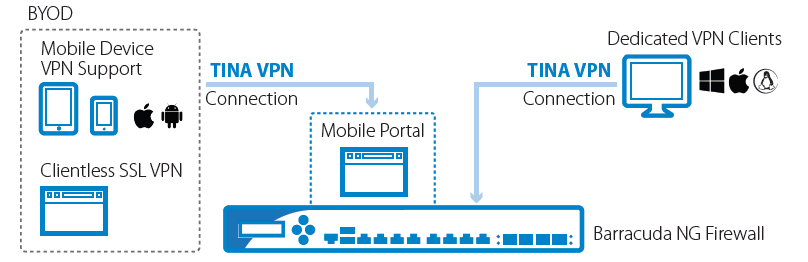
The influx of private computing devices, from smartphones to laptops and tablets, into the workplace may help increase productivity, flexibility, and convenience. However, BYOD adds new security challenges and risks, such as enabling and controlling access, as well as preventing data loss. Barracuda CloudGen Firewall provides strong capabilities to give users the full advantage of their devices while reducing possible risks to the business. Unwanted applications can be blocked, LAN segmentation can protect sensitive data, and network access control can check the health state of each device connecting to the corporate network.
Barracuda's Mobile Portal enables you to set up shortcuts on the home-screen of devices such as smartphones or tablets. When accessing the portal via the web browser on a mobile device, users can browse apps, network folders and files as if they were connected to the office network. The Mobile Portal supports most of commonly used devices, e.g., Apple iOS, Android, and Blackberry devices and is part of the "NG SSL VPN and NAC" subscription.
Dedicated VPN Clients
Every Barracuda CloudGen Firewall unit supports an unlimited number of VPN clients at no extra cost. The Barracuda VPN client also provides the ability to enforce Windows Security Center settings on client machines running Windows. This allows administrators to centrally enforce the usage of Windows Security settings on PCs. The enforced policies can include enabling the Microsoft Network Firewall, Windows Updates, Windows Virus Protection, Windows Spyware Protection, and Internet Security Settings.
Barracuda VPN Clients are available for Microsoft Windows, Mac OS, and various Linux systems.
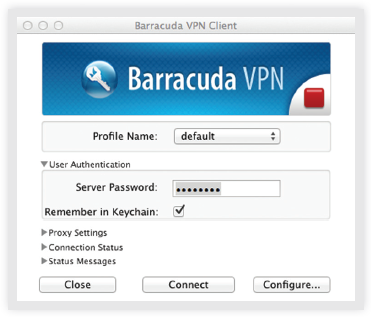
Barracuda VPN Client for Mac OS
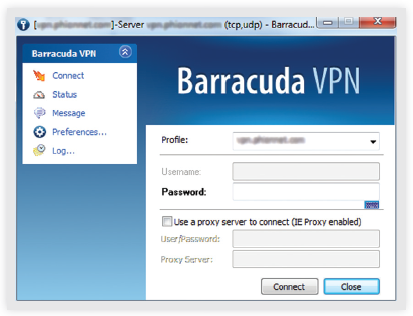
Barracuda VPN Client for Windows 7
Network Access Control
The optional Barracuda CloudGen Firewall SSL VPN and NAC subscription adds a customizable and easy-to-use portal-based SSL VPN as well as sophisticated Network Access Control (NAC) functionality.
The Barracuda Network Access Client, when used with a Barracuda NG Firewall, provides centrally managed Network Access Control (NAC) and an advanced personal firewall. This allows enforcement of minimum Windows client security prerequisites before being allowed access to the network or access to a quarantine network. Security posture can be specified according to available Windows patch level, availability of antivirus and/or anti-spyware, and user ID. Access restrictions are enforced locally on the client by the centrally managed personal Windows firewall as well as at the gateway. Using existing Barracuda NG Firewall appliances, Barracuda Networks offers a ready-to-use Network Access Control framework without expensive investments into the basic network infrastructure. All Barracuda Network Access Clients as well as all Barracuda CloudGen Firewall units acting as policy servers can be administered, monitored, and reviewed via the Barracuda NextGen Control Center.
TINA - Barracuda's VPN Protocol
Due to the limitations that come with standard IPsec connections Barracuda Networks created several powerful extensions to standard IPsec tunnel management. This core of the Barracuda NG VPN engine is called TINA (Transport Independent Network Architecture).
The TINA protocol allows to use TCP, UDP, ESP, and IPsec protocols for high speed VPN connections which improves the VPN connectivity substantially by adding:
- Endpoint-to-Endpoint (not network-to-network) connectivity
- NAT friendliness
- Multiple physical transport paths for a logical tunnel
- Multiple tunnels in between two locations
- HTTPS and SOCKS4/5 proxy compatibility
- Dynamic Address Support
- Tunnel heartbeat monitoring
Central Management across the Enterprise
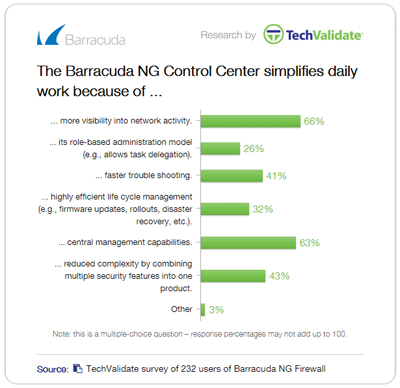
To centralize management across many different firewalls and remote access users, the Barracuda NextGen Control Center enables administrators to manage and configure security, content, traffic management, and network access policies from a single interface. Template-based configuration and globally available security objects enable efficient configuration across thousands of locations.
The Barracuda NextGen Control Center helps significantly reduce the cost associated with security management while providing extra functionality both centrally and locally at the managed gateway. Software patches and version upgrades are centrally controlled from within the management console and deployment can be applied to all managed devices.
Highly customizable administrative roles can be defined to delegate administrative capabilities for specific departments or locations.
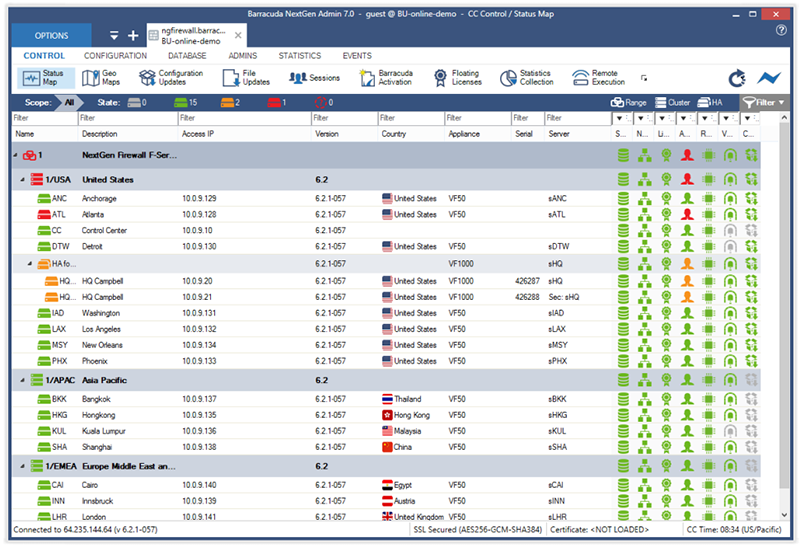
Barracuda NextGen Control Center's Status Map displays a drill down status overview of all centrally managed Barracuda CloudGen Firewall units.
Scalable Deployment
Managing the security issues in a widely distributed enterprise network can be painful and extremely time consuming. Managing a system may take only 15 minutes per day. But having 20 firewall systems in place results in five hours per day – just to manage the existing system. With Barracuda NextGen Control Center, managing mulitple Barracuda CloudGen Firewalls takes the same amount of time as managing one.
- Create pre-configured templates for easy-rollout.
- Have all information about the enterprise security deployment available in real time.
- Create reports of either one or all Barracuda CloudGen Firewalls.
Lifecycle Management
Scalable Barracuda CloudGen Firewalls offer companies sustainable investment protection. Energize Updates automatically provide the latest firmware and threat definitions to keep the appliance up to date. With a maintained Instant Replacement subscription, organizations receive a new appliance with the latest specs every four years.
Barracuda Virtual Appliances FAQ:
What is a “virtual appliance”?
A virtual appliance is a software image designed to run inside a virtual machine. When deployed inside a virtualization platform, such as VMware, multiple virtual appliances can share the physical resources of a single host computer while remaining logically isolated from each other. Barracuda Networks currently offers virtual appliance versions of many of its popular hardware appliance solutions to leverage the benefits of virtualization.
What are the benefits of Barracuda Virtual Appliances?
Barracuda Virtual Appliances provide the same technology found in the Barracuda Networks hardware solutions and are ideal for enterprises that are standardizing hardware platforms or with existing virtual environments. Barracuda Virtual Appliances can be deployed on standard virtualization platforms and can co-exist with other virtual machines, thereby enabling optimal usage of hardware resources. As the organization grows, virtual appliances can be scaled for capacity without changing any hardware or software configurations. Also, virtual appliances can be easier to backup and restore using standard mechanisms for disaster recovery.
What are the System requirements to run the Barracuda Virtual Appliance?
Currently, Barracuda Virtual Appliances are supported on the following platforms
- VMware ESX and ESXi ("vSphere Hypervisor") versions 4.0, 4.1, 5.0, 5.1
- VMware ESX and ESXi version 3.5
- VMware Server 2.0+
- VMware Workstation 6.0+, Player 3.0+
- VMware Fusion 3.0+
- Sun/Oracle VirtualBox and VirtualBox OSE version 3.2
- Citrix XenServer 5.5+
A minimum of 2 GB RAM per core and 60 GB available hard disk space is recommended. More information can be found in the README file available in the download package.
Are Barracuda Virtual Appliances as easy to deploy as the Barracuda Networks hardware appliances?
Yes. Barracuda Virtual Appliances are specifically designed for ease of deployment in new or existing virtualization environments. The virtual appliances are fully encapsulated with the virtual hardware configuration and the setup process is simple. Once the virtual appliance is installed, configuration and administration is through the same intuitive Web based user interface as that on the appliance. Instructions can be found in the online setup guides available as part of the download or under the Documentation section at www.barracuda.com/virtualization.
Do the Barracuda Virtual Appliances receive Energize Updates?
Yes. The Barracuda Networks Energize Updates subscription provides the latest security updates and is an essential part of purchasing either a Barracuda Networks hardware solution or a virtual appliance.
How does an administrator interact with a Barracuda Virtual Appliance?
Once deployed, Barracuda Virtual Appliances are administered through the same simple Web based user interface found on the hardware equivalents. This makes it very easy for administrators of Barracuda Networks hardware appliances to support Barracuda Virtual Appliances without learning a new usage model.
Can I make copies of my Barracuda Networks virtual appliance and deploy them for redundancy?
Every active instance of a Barracuda Virtual Appliance must be supplied a unique license token that is obtained during the process of requesting an evaluation. If you choose the ZIP deployment method, the same ZIP file can be used for multiple deployments, but each deployment must be provisioned with a unique token. Cold backups, snapshots, host migration and other backup or disaster recovery operations are fully supported.
Can I cluster a Barracuda Virtual Appliance with its hardware counterpart?
Yes. The “Linked Management” feature can be used to cluster a combination of Barracuda Virtual Appliances and hardware equivalents as appropriate.
What is an OVF template?
Open Virtualization Format (OVF) is a standard to package and distribute virtual machines. It is a portable, platform independent file format that is supported by several hypervisors. An OVF file encapsulates the complete specification of a virtual machine including all the virtual disks, virtual hardware configuration (CPU, memory, networking) and storage. Barracuda Virtual Appliances are distributed as OVF templates that facilitate quick provisioning with little or no manual intervention.
How do I update the firmware on a Barracuda Virtual Appliance?
New firmware releases will be available periodically and are included in the Energize Updates subscription. Once the virtual appliance is deployed, administrators can check for available firmware releases and upgrade as appropriate.
How are the Barracuda Virtual Appliances priced?
Subscriptions for the Barracuda Spam & Virus Firewall Vx and Barracuda SSL VPN Vx Virtual Appliances are usually priced in terms of user bands. As the organization grows, administrators can easily expand the capacity of these virtual appliances by purchasing incremental subscriptions as needed without the overhead of provisioning any additional hardware or software.
How can I evaluate a Barracuda Virtual Appliance?
A 30-day evaluation copy of any Barracuda Virtual Appliance can be obtained by filling the evaluation request form online. This will generate an email with download and activation instructions.