

Read our Blog!
Twitter Us!

Barracuda Networks Certified Diamond Partner

Barracuda Networks Certified Support Engineer

Barracuda Networks - The trusted source for spam, spyware, virus, and content blocking.Barracuda Networks IM Firewall 820

All-in-one instant messaging solution for archiving, content filtering, and policy management
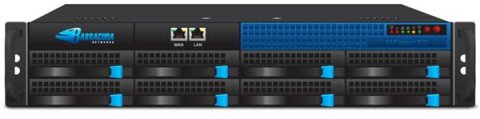
Barracuda Networks IM Firewall 820Free Dell Netbook! Buy a Barracuda Model 400 or above and get a free Dell Netbook Mini 10v!

Barracuda Networks Products
Barracuda Networks IM Firewall 820
Barracuda IM Firewall 820
Note: The purchase at least 1 Year of Energize Updates is required
* Get FREE Barracuda T-Shirt
* Get a FREE Dell Netbook Mini 10v until 07/31/10
#BMF820A
List Price: $27,999.00
Our Price: $26,599.00

Click here to jump to more pricing!

Click here for a Barracuda LIVE DEMO!Barracuda Networks IM Firewall 820 Overview:

The Barracuda IM Firewall is the first and only all-in-one instant messaging appliance available.

  • IM traffic identification and logging
  • Exports to message archiving solutions
  • Public IM access controls
  • Virus scanning of all incoming messages and files
  • File transfer management
  • Keyword notification and content management
  • A private and secure IM server and client solution
  • Access to internal and all public IM networks from a single client

Comprehensive Solution

The Barracuda IM Firewall is the first product to provide everything an organization needs to control and manage internal and external instant messaging (IM) traffic. It combines an integrated IM server and gateway solution that is powerful, easy to use and affordable for businesses of all sizes. Installing in minutes, it can easily and completely identify and manage both internal and public IM traffic within your organization. Using the Barracuda IM Firewall, your organization can eliminate the security, virus, or compliance risks of instant messaging while harnessing the communications and productivity benefits for which IM has become an indispensable asset.

Barracuda IM Firewall Architecture

Most instant messaging products provide either an IM server for secure internal instant messaging within your organization, or an IM gateway to identify, log, and report on existing IM traffic. The Barracuda IM Firewall is a secure IM server with a feature rich IM management solution in an appliance format. This two-tiered approach provides organizations a complete IM solution within minutes.

Easy to Use

The Barracuda IM Firewall is easy to set up and rollout to your users. Installing a unit inline takes minutes and, once connected, all public IM traffic is captured and logged to an internal database. With an intuitive user interface for maintenance and monitoring, the Barracuda IM Firewall is a virtually administration-free solution. When using the IM server, user deployment features such as an email rollout tool allow users to have the client installed and connected in minutes. System updates are delivered automatically by Barracuda Central, an advanced 24/7 security operations center that works to continuously to provide the most effective methods to identify and control public IM traffic and combat ever-changing virus variants. Energize Updates are distributed hourly so that you are always protected against the latest threats.

Affordable

Large and small organizations alike demand solutions that are affordable not just for today, but also for the future as they grow. The Barracuda IM Firewall enables organizations to grow without having to worry about increasing user license fees. With no per user license fees, the Barracuda IM Firewall is the most affordable secure IM server and management solution available.

Features:

IM Gateway

The Barracuda IM Firewall provides IM gateway features allowing simple and rapid installation and management of public IM traffic on a network. Upon installation the Barracuda IM Firewall will begin identifying and logging IM traffic to its internal database for future viewing or auditing. Control of public IM services such as AOL, Yahoo, and MSN has become essential in order to maintain network security, message confidentiality, and protection against viruses. The Barracuda IM Firewall provides the ability to log or block public IM services, scan public IM traffic for viruses, and manage the identities of public IM users on your network

IM Server

The integrated Instant Messaging server provides companies with a secure internal IM network. Internal messages need never leave the corporate network, and are protected by industry-leading 256-bit encryption. The Barracuda IM Client provided with the product comes with client rollout and roster management tools, and is easy to install and deploy.

Security

The Barracuda IM Firewall offers one of the highest levels of message encryption available on any IM product. Its 256-bit message encryption ensures that your corporate messages remain private as long as you are using the Barracuda IM Client. The client provides users security even outside their corporate network from anywhere on the Internet.

Logging/Reporting

The Barracuda IM Firewall can automatically send completed IM conversations via email to message archiving solutions, such as the Barracuda Message Archiver, to enable centralized retention and management of both email and IM messages.

Keyword Tools

Keyword notification and content management tools ensure that your users are adhering to your internal policies and government compliance regulations. Keywords, phrases, and regular expressions can be identified, removed, or blocked entirely within IM conversations. If a policy violation is committed, the appropriate parties can be notified via email or IM. All policy violations are logged and noted.

Central Administration

The Barracuda IM Firewall features an easy-to-use Web interface allowing for easy and cost effective administration. The Web interface allows you to define, manage and control corporate IM policies from one central place.

  • Barracuda Energize Updates - A team of security engineers at Barracuda Central continuously monitors the Internet for trends in IM and virus attacks. As they detect trends, updates are created for the Barracuda IM Firewall. The Barracuda IM Firewall is then automatically updated with new IM rules for managing public IM protocols and services and virus definitions. These updates require zero administration and ensure that your network has comprehensive and accurate protection.
  • Logs and Graphical Reports System - Administrators can view logs or generate graphical reports to provide visibility within the organization. The Barracuda IM Firewall can provide information on IM conversations, public IM access, file transfers, presence, viruses, and more.
  • No Per User Charges - Barracuda IM Firewall pricing is simple. Each Barracuda IM Firewall is designed to handle an approximate number of users. The Barracuda IM Firewall includes a robust feature set at one fixed price with no per user charges. This means the system administrator no longer has to worry about keeping track of new accounts.

LDAP Integration

The Barracuda IM Firewall integrates seamlessly with any LDAP compliant directory servers including Microsoft Active Directory, Novell eDirectory, Lotus Domino, and Open LDAP. Once the directory server is integrated, the Barracuda IM Firewall can manage policies using LDAP users and groups.

Rollout Tools

Rolling out and installing the Barracuda IM Client software is simple. Administrators can choose to roll the client out to users via an email containing username and password information, a download link for the client, and installation instructions. Installation is fast and easy, and can be performed by your end users in three clicks. The zero configuration installer automatically knows the name of the server to which that user will connect. Additionally, contact lists can be automatically populated using the Barracuda Roster Push tool, providing administrators the ability to populate their users’ contact lists before first log on, or when an employee joins or leaves the organization.

Model Comparison:

There are five models of the Barracuda Instant Messaging Firewall currently available. The entry level, Barracuda IM Firewall 220 handles more than 200 users, while the largest model, the Barracuda IM Firewall 820 handles 7,000. These specifications are not limits of the system, but are the recommended capacity.

Model Comparison 220 320 420 620 820
CAPACITY*
Max Users 200 500 1,000 3,000 7000
HARDWARE
Rackmount Chassis 1U Mini 1U Mini 1U Mini 1U Fullsize 2U Fullsize
Dimensions (in.) 16.8x1.7x14 16.8x1.7x14 16.8x1.7x14 16.8x1.7x22.6 17.4x3.5x25.5
Dimensions (cm.) 42.7x4.3x35.6 42.7x4.3x35.6 42.7x4.3x35.6 42.7x4.3x57.4 44.2x8.9x64.8
Weight (lbs./kg.) 12 / 5.4 12 / 5.4 12 / 5.4 26 / 11.8 46 / 20.9
Ethernet 1 x 10/100 1 x 10/100 1 x 10/100 2 x Gigabit 2 x Gigabit
Ethernet Passthrough** 1 x 10/100 1 x 10/100 1 x 10/100 1 x Gigabit 1 x Gigabit
AC Input Current (Amps) 1.0 1.2 1.4 1.8 3.5
Redundant Disk Array (RAID)       Yes Hot Swap
Redundant Power Supply         Hot Swap
ECC Memory       Yes Yes
FEATURES
Hardened and Secure OS Yes Yes Yes Yes Yes
Capture and Manage Public IM Yes Yes Yes Yes Yes
Internal Secure IM Server/Client Yes Yes Yes Yes Yes
Centralized Policy Management Yes Yes Yes Yes Yes
Keyword Notification Yes Yes Yes Yes Yes
Secure File Transfer Yes Yes Yes Yes Yes
Disclaimers Yes Yes Yes Yes Yes
LDAP and Active Directory Support Yes Yes Yes Yes Yes
Per User and Group Access Control   Yes Yes Yes Yes
Ethernet Bypass Hardware   Yes Yes Yes Yes
Customizable Branding       Yes Yes

*Capacity depends on environment and selected options.
**Each ethernet passthrough has two Ethernet jacks.

Deployment:

Standard Deployment Configuration

The Standard deployment configuration consists of simply placing the Barracuda IM Firewall on your network between your Internet Firewall and your LAN, and assigning an IP address for access and configuration via the Barracuda Web-based administration interface.

Typical Deployment

Mirrored Port Deployment Configuration

If an inline deployment is not an option for your network, the Barracuda IM Firewall can be configured to listen to IM traffic on a mirrored port from your switch. All services work in this mode except any public IM blocking features since a mirrored port is read only. Since both the Barracuda IM Firewall and the Barracuda Web Filter sit inline, the mirrored port deployment is common when used with a Barracuda Web Filter.

Mirrored Port Deployment Configuration

Server Only Deployment Configuration When using only the IM server of the Barracuda IM Firewall, the product may be installed anywhere on the network. Typically the server will be placed in a DMZ for access by remote users and any other Barracuda IM Firewalls with which secure communication is desired. For this type of deployment, it is recommended that the public IM networks are blocked either by the corporate firewall or by the Barracuda Web Filter.

Server Only Deployment Configuration

Administration:

Configuration

Configuration of the Barracuda IM Firewall is accomplished through a simple Web-based administration interface that is built into the system. There is no software to install and no CDs or floppies to lose.

Statistics Reporting

The Barracuda IM Firewall's administrative tools feature state-of-the-art, statistical reporting that give you a visual edge on IM usage within your network.

Statistics Reporting
LDAP Integration

LDAP-compatible directory services, such as Microsoft Active Directory, are supported by the Barracuda IM Firewall making it possible to use the users and groups already on the network. Integration with LDAP allows administrators to create accounts and policy rules with ease. Users and groups from an existing directory system can be used when creating rules governing access to public IM networks, file transfer privileges, keyword tools, and user rosters.

LDAP Integration
Keyword Tools

Keyword Tools give administrators the option to be alerted when certain key words, phrases, or regular expressions are used in an IM conversation by their users. Notifications can be sent to any email or IM address specified by the administrator.

Keyword Tools
User Reporting

User reports can be generated to display a detailed picture of employee IM use and presence, providing a graphical view of its use and helping to prevent abuse, both within your network and on the public IM channels.

User Reporting
Daily Reporting

Daily Reports can be sent to any email address specified by the administrator. Reports can be used to track the most prolific IM users on your network, both internally and externally, as well as track times of peak IM usage and the most frequent hyperlinks sent amongst your users.

Daily Reporting

Screenshots:

The following screenshots illustrate the Web user interface of the Barracuda IM Firewall .

Basic -> Status

Basic -> Status

Displays the current status of the appliance, including statistics on overall internal IM traffic, public IM traffic, attempted policy violations and blocked viruses.

Domains -> Domain Manager

Domains -> Domain Manager

List of domain names for internal IM traffic. Provides settings for handling LDAP integration on a per domain basis and to send rollout emails to all internal IM users in a domain.

Basic -> Virus Checking

Basic -> Virus Checking

Enables antivirus engine to scan file transfers for both internal and public IM traffic.

Policy -> Public IM Access

Policy -> Public IM Access

The Public IM Proxy section defines policy for usage of third party IM transports when used with the Barracuda IM Client.

The Public IM Gateway section defines policy for usage of public IM clients when used inline or in span port mode.

Basic -> IP Configuration

Basic -> IP Configuration

Controls the settings for IP, DNS and Domain configuration. The Barracuda IM Firewall can journal all completed IM conversations to the Barracuda Message Archiver for unified access to both email and IM messages.

Policy -> File Transfer Access

Policy -> File Transfer Access

The File Transfer Access section defines policy for file transfers with the internal IM service, using the Barracuda IM Client.

The Third Party File Transfer Access section defines policy for usage of public IM clients when used inline.

Basic -> Administration

Basic -> Administration

Controls the settings for Password, Time Zone and Administrator IP Range. System administrators can also send broadcast IM messages to all connected users from this screen.

Policy -> Disclaimers

Policy -> Disclaimers

Specifies the text to be appended to the beginning of all conversations utilizing the internal IM service. Typically disclaimers remind participants that conversations are logged.

Logs/Reports -> Message Log

Logs/Reports -> Message Log

Lists an entry for each IM message and enables administrators to filter messages by protocol (internal, Yahoo! Messenger, MSN Messenger, AIM or ICQ), sender, recipient and message contents.

Policy -> Content Filtering

Policy -> Content Filtering

Defines content filtering policies to block or mask out IM content that matches specified regular expression filters. This feature is useful for masking out credit card numbers, social security numbers or other information that may not be appropriate for IM conversations.

Logs/Reports -> Conference Log

Logs/Reports -> Conference Log

Lists an entry for each file transfer attempt over public or internal IM protocols. The “Action” field indicates whether file transfers were blocked due to virus infections or policy.

Advanced -> Backup

Advanced -> Backup

Backup / Restore configuration

Logs/Reports -> File Transfer Log

Logs/Reports -> File Transfer Log

Lists an entry for each file transfer attempt over public or internal IM protocols. The “Action” field indicates whether file transfers were blocked due to virus infections or policy.

Advanced -> Energize Updates

Advanced -> Energize Updates

Sets virus definition and security update intervals.

Logs/Reports -> Presence Log

Logs/Reports -> Presence Log

Lists an entry for each change in presence status (Available, Free for Chat, Away, Not Available, Do Not Disturb, Offline) on the internal IM server.

Advanced -> Firmware Update

Advanced -> Firmware Update

Provides firmware download options.

Logs/Reports -> Daily Reports

Logs/Reports -> Daily Reports

Schedules summary reports of system activity to be sent via email.

Advanced -> Log Management

Advanced -> Log Management

Enables administrators to set retention policies for logged messages.

Logs/Reports -> User Reports

Logs/Reports -> User Reports

Generates reports for an individual user’s activity.

Advanced -> Syslog

Advanced -> Syslog

Sets syslog server connection.

Users -> Account View

Users -> Account View

Displays a list of internal IM users with accounts on the Barracuda IM Firewall.

Advanced -> IP Config

Advanced -> IP Config

Enables use of the Ethernet port on the back of the Barracuda IM Firewall to perform administration and access to the internal IM Server. Typically, the back port is utilized for administration and IM access when administrators also want to connect both tap ports of a passive Ethernet tap, such as the Barracuda Ethernet Tap, to the Ethernet bridge on the front of the Barracuda IM Firewall 320 or higher.

Users -> Third Party IM Users

Users -> Third Party IM Users

Displays a list of public IM users detected by the Barracuda IM Firewall while inline or in span port mode.

Advanced -> Secure Administration

Advanced -> Secure Administration

Configures use of HTTPS for the Web administration interface.

Users -> User Add/Update

Users -> User Add/Update

Creates local IM user accounts on the Barracuda IM Firewall when using LDAP directory integration is not appropriate.

Advanced -> Troubleshooting

Advanced -> Troubleshooting

Provides support diagnostics and network connectivity tests for troubleshooting.

Users -> Roster Creation

Users -> Roster Creation

Enables administrators to control which users and groups appear in the Barracuda IM Client. Administrators can roll out different contact lists or “rosters” to different users.

Advanced -> Task Manager

Advanced -> Task Manager

Displays list of background tasks such as running firmware downloads.

Users -> Client Configuration

Users -> Client Configuration

Enables administrators to set the standard Barracuda IM Client version to roll out to users and make available on the client download pages.

Barracuda IM Client Interface

Barracuda IM Client Interface

Displays IM client and active conversation window.

Users -> User Rollout

Users -> User Rollout

Controls the settings for automated rollout emails to be sent to end users when their accounts are created.


Documentation:

PDF File
Download the Barracuda Networks IM Firewall Data Sheet (.PDF)

Pricing Notes:

Energize Updates and Instant Replacement Subscriptions need to be maintained for every Barracuda Product. Renewal purchases will backdate to the Expiration of your current subscriptions, no exceptions.
Barracuda Networks Products
Barracuda Networks IM Firewall 420
Barracuda IM Firewall 820
Note: The purchase at least 1 Year of Energize Updates is required
* Get FREE Barracuda T-Shirt
* Get a FREE Dell Netbook Mini 10v until 07/31/10
#BMF820A
List Price: $27,999.00
Our Price: $26,599.00
Barracuda Networks Energize Updates
1 Year Energize Updates #BMF820A-E1
Our Price: $5,842.00
3 Year Energize Updates #BMF820A-E3
Our Price: $14,914.00
5 Year Energize Updates #BMF820A-E5
Our Price: $23,369.00
Barracuda Networks Instant Replacement
1 Year Instant Firewall Replacement #BMF820A-H1
Our Price: $5,842.00
3 Year Instant Firewall Replacement #BMF820A-H3
Our Price: $14,914.00
5 Year Instant Firewall Replacement #BMF820A-H5
Our Price: $23,369.00
Barracuda Networks Repair
Repair of Barracuda Model 8X0 #FIX800
Our Price: $2375.00
Barracuda 8X0/9X0 Power Supply #BPHD-01
Our Price: $665.00