 Barracuda Link Balancer Overview:
The Barracuda Link Balancer is an affordable and powerful solution for routing and managing traffic across multiple Internet connections. Designed to scale for high bandwidth requirements and provide business continuity for an organization of any size, the Barracuda Link Balancer optimizes the use of multiple Internet links, such as T1s, T3s, DSL and cable connections from one or multiple Internet service providers. Capable of automatic failover in the event of link failure, the Barracuda Link Balancer helps ensure that your network is always connected to the Internet.
- Incoming and outgoing network traffic balancing across multiple Internet links
- Automated failover in case of link failure
- Bandwidth management
- Quality of Service (QoS) for Internet applications
- Traditional firewall
- Provides site-to-site VPN with link failover
The Barracuda Advantage
- Deploys rapidly while retaining existing firewall and router settings
- Inbound link load balancing using authoritative DNS
- Automatic VPN failover and failback between Internet links
- Application-aware traffic shaping across Internet links
Product Spotlight
- Dynamic link load balancing and failover across multiple ISPs
- Ensure's maximum Internet uptime and high availability
- Real-time visibility into health, performance, and utilization of Internet links
 |
Cost-Effective Internet Continuity
Internet continuity is just as important as application and data availability in a business continuity plan. The Barracuda Link Balancer provides: automatic Internet link monitoring and failover, which prevents Internet downtime and lost employee productivity during ISP outages. Key services such as web, voice, and email continue to be available to customers and partners, protecting the business and brand. |
 |
Scale Bandwidth and Performance
Scale bandwidth and increase reliability without purchasing expensive backup lines. Transparent switching and failover across multiple Internet links based on active monitoring of link health and performance guarantee maximum speed and reliability. Application-aware traffic shaping allows granular bandwidth prioritization for critical Internet applications and infrastructure across one or more Internet links. |
 |
Quick Return on Investment
The Barracuda Link Balancer is affordably priced, without any per-user or per-port fees. Drop-in, transparent deployment ensures rapid installation with minimal disruptions to existing network infrastructure. It provides immediate return on investment by allowing the provisioning of underutilized backup links or the use of low-cost Internet links instead of expensive T1 lines – while making Internet connectivity more reliable. |
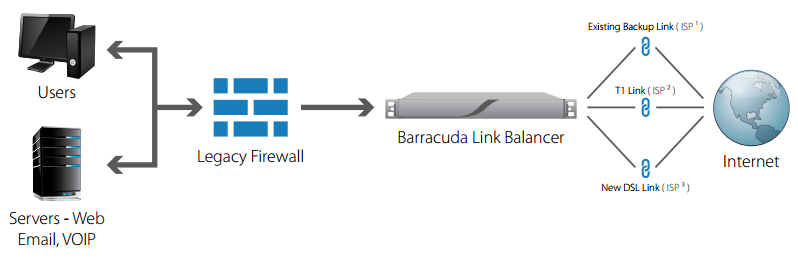
The Barracuda Link Balancer manages multiple concurrent Internet connections
Cost-Effective Internet Performance and Availability
The Barracuda Link Balancer dynamically balances traffic across multiple ISP links to ensure Internet continuity and availability, even during ISP outages. It balances both outbound and inbound traffic intelligently, so users have Internet access whenever they need it. Application prioritization and granular quality-of-service (QoS) policies assure priority to business-critical application traffic – and the applications remain available even when links fail. It deploys quickly and transparently into existing networks without changes to configuration or topology. Secure and affordable, the Barracuda Link Balancer streamlines bandwidth management while providing maximum Internet access.
Cost-Effective Internet Performance and Availability
As data traffic grows exponentially – and organizations grow ever more dependent on continuous connectivity – the ability to intelligently and dynamically balance traffic across multiple Internet links is critical to efficiently maintain day-to-day operations. The Barracuda Link Balancer deploys transparently in front of legacy firewalls that cannot handle such requirements.1
1 For information on Barracuda Firewalls, which include link balancing, see the Barracuda Firewall and Barracuda NG Firewall datasheets.
Features:
Link Load Balancing
The Barracuda Link Balancer intelligently distributes load across diverse links including high-speed MPLS, T1, and T3 lines, as well as low-cost DSL and cable connections from multiple ISPs. It scales bandwidth and intelligently distributes traffic across links based on business policies, cost, and key performance metrics. Multiple link load balancing algorithms are available and connection persistence is maintained.
Link Failover and Failback
Link availability and performance is continuously monitored using multiple protocols and metrics like DNS, Ping, HTTP, and performance. When link failure or saturation is detected, the Barracuda Link Balancer instantly reroutes traffic through the available links. It automatically fails back when the ISP restores service. During link failover/failback, the Barracuda Link Balancer maintains application traffic and VPN priorities.
Inbound Link Balancing Using DNS
Inbound link balancing distributes incoming traffic from Internet-facing services across multiple ISP links by using built-in Authoritative DNS services. It assigns link-specific IP addresses to each domain and then balances DNS queries to that domain across the available links. Failed links are removed from the DNS tables and are added back only when they have been restored.
Transparent Deployment
Under the preferred transparent mode of deployment, the Barracuda Link Balancer plugs into an existing network to perform link load balancing transparently, without requiring any changes on network firewalls, routers, VPNs, or hosts.
Site-to-Site IPsec VPN
For secure site-to-site connectivity, the Barracuda Link Balancer comes with a built-in IPsec VPN gateway. In case of link failover and failback, VPNs fail over to available links and maintain traffic priorities to ensure uptime for critical organizational services across the WAN. MPLS links can be set to failover to IPsec VPN links.
Application Prioritization and Quality of Service (QoS)
The Barracuda Link Balancer lets administrators create policies that automatically prioritize traffic from Internet applications. For example, web browsing and email can be assigned guaranteed bandwidth while peer-to-peer applications and media streaming can be assigned a lower priority. Policies can be defined using traditional IP addresses and port numbers or by using application-layer signatures, such as VOIP, P2P, etc.
DHCP Server
The Barracuda Link Balancer comes with a DHCP server to assign dynamic IP addresses to LAN clients. Along with traditional DHCP options, administrators can view active leases in real time. Multiple LAN subnets can be configured and served by the DHCP server.
High Availability
A pair of Barracuda Link Balancers can be configured in an active/standby cluster*. Configuration is automatically synchronized across the units. If the active unit goes down for any reason, the standby unit assumes all the responsibilities of the master unit. Clustering is based on the Virtual Router Redundancy Protocol (VRRP).
*HA and Ethernet bypass are available with models 330 and 430 only.
Basic Firewall Functions
In firewall-enable mode, basic network firewall functions like 1:1 NAT, IP access lists, and port forwarding are supported. For next-generation firewall capabilities, consider the Barracuda Firewall.
Logs and Reports
Logs and reports provide clear visibility into link activity with minimal effort. The Barracuda Link Balancer provides information on bandwidth usage, VPN traffic, firewall activity, and much more.
Model Comparison:
The Barracuda Link Balancer scales to the needs of organizations ranging from small businesses to the largest enterprises. The entry level Barracuda Link Balancer 230 handles two Internet links. The higher capacity Barracuda Link Balancer 430 handles up to seven Internet links. These specifications are not hard limits of the system, but are recommended capacity.
| Model Comparison |
230 |
330 |
430 |
| Internet Link Connections |
2 |
3 |
7 |
| Maximum Throughput |
150 Mbps |
300 Mbps |
550 Mbps |
| Recommended Number of Site-to-Site VPN Peers* |
10 |
20 |
35 |
| Rackmount Chassis |
1U Mini |
1U Mini |
1U Mini |
| Dimensions (in) |
16.8 x 1.7 x 9 |
16.8 x 1.7 x 14 |
16.8 x 1.7 x 14 |
| Weight (lbs) |
8 |
12 |
12 |
| Ethernet |
3 x 1 Gigabit |
5 x 1 Gigabit |
9 x 1 Gigabit |
| Ethernet Passthrough |
|
1 x Gigabit |
1 x Gigabit |
| AC Input Current (amps) |
1.0 |
1.2 |
1.2 |
| Transparent "Drop-in" Deployment |
|
|
|
| Link Balancing |
|
|
|
| Link Health Monitoring |
|
|
|
| Link Failover |
|
|
|
| Network Traffic Firewall |
|
|
|
| Built-in DHCP Server |
|
|
|
| Built-in Authoritative DNS |
|
|
|
| SNMP |
|
|
|
| Site-to-Site VPN |
|
|
|
| Bandwidth Management and QoS |
|
|
|
| Ethernet Bypass Hardware |
|
|
|
| Clustering/High Availability |
|
|
|
| Reporting |
|
|
|
| Customizable Branding |
|
|
|
*Multiple subnets (phase 2 entries) to a peer will reduce capacity. Max subnets supported to the same peer is 3.
Technical Spec

Link Balancing
- WAN and Internet connection link balancing
- Inbound link balancing
- Automated link failover and failback
- Link health monitoring
– Ping
– HTTP
– DNS
– TCP port checking
- Link speed assignment and weighting
- Transparent "drop in" mode

Basic Firewall Functions
- Network Address Translation (NAT)
- 1:1 NAT
- Port forwarding
- Firewall IP Access Control Lists (ACLs) and rules
- Firewall transparency

Network Services
- DHCP server
- Authoritative DNS server
- DNS request forwarding
- Site-to-site VPN
- Outbound Source NAT
- VLAN support
 Bandwidth Management and Quality of Service (QOS)
- Application-based priority assignments
- Custom port-based application definition
- Preconfigured protocols:
– Web
– Email
– FTP
– DNS
– Network Authentication
– Terminal Services
– SIP
System Features

Administrators
- Web-based interface
- Traffic and performance monitoring
- Event logging
- SNMP support
- Secure remote administration
- Reporting
Support Options

Barracuda Energize Updates
- Firmware updates
- Security updates
- Standard technical support

Instant Replacement Service
- Replacement unit shipped next business day
- 24x7 technical support
- Hardware refresh every four years
Deployment and Administration:
Deployment:
Standard Deployment as a Network Firewall:
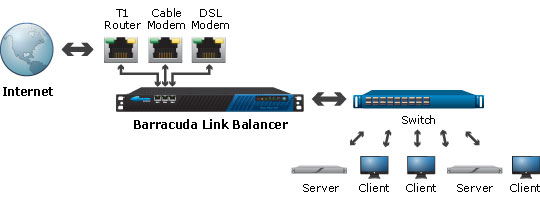
The standard deployment places the Barracuda Link Balancer as the default gateway for the client’s network. Sitting in between the Internet and switch, administrators can utilize the Barracuda Link Balancer to apply traditional network firewall rules, including DHCP and DNS services to local clients.
Optional Deployment with Existing Network Firewall:
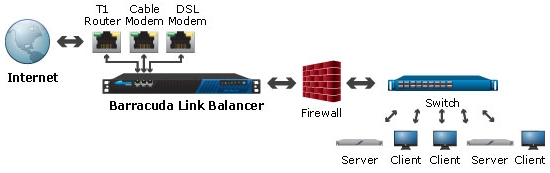
An optional deployment configuration simply places the Barracuda Link Balancer at the perimeter between the Internet and a network firewall for local network address translation. The Internet connection links plug into the Barracuda Link Balancer’s multiple WAN ports and the firewall is connected to the Barracuda Link Balancer’s LAN port.
Administration:
Configuration of the Barracuda Link Balancer is accomplished by accessing a simple Web user interface. Requiring only a Web browser with network access to the Barracuda Link Balancer’s LAN interface, there is no additional software to install or configure.
The Web-based configuration screens are comprehensive, allowing full configuration of every feature and enables easy firmware and security upgrades. The configuration screens also provide access to easy-to-understand network traffic statistics, utilization and availability information.
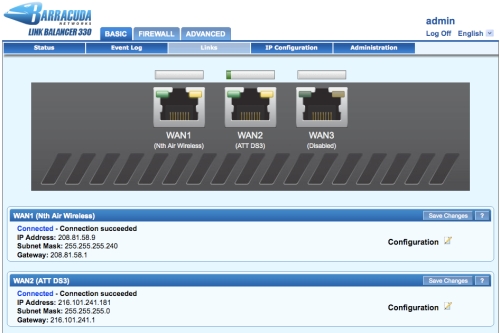
Initial configuration is easy: simply plug multiple Internet connections into the Barracuda Link Balancer’s WAN ports, define the speed of each connection, then configure DHCP or static IP WAN IP addresses. The Barracuda Link Balancer automatically sends client requests to the link with the most available Internet bandwidth and sends requests to links that are available and healthy in the network.
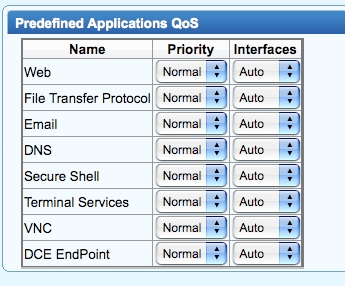
Bandwidth management and Quality of Service is easy to understand: simply assign high, medium or low priority to the required application.
Barracuda Link Balancer FAQ:
What is the Barracuda Link Balancer? How is it different from a Barracuda Load Balancer?
Available in three models, the Barracuda Link Balancer routes and manages traffic across multiple Internet connections from one or numerous Internet service providers. In contrast, the Barracuda Load Balancer distributes Internet traffic to multiple Web servers to maintain high availability for Web applications, FTP sites, media streaming and content delivery networks.
How does the Barracuda Link Balance help aggregate Internet traffic?
Without intervention from an administrator, the Barracuda Link Balancer combines Internet traffic from multiple high-speed Internet connections into one queue. When a client request is made, the Barracuda Link Balancer chooses the best available link for the ideal client experience. Clients and applications can also ensure compatibility with load balanced applications by setting up persistence to specific links on a permanent or automated period basis.
How does the Barracuda Link Balancer prioritize traffic?
Administrators can define traffic and applications which should have a higher or lower WAN priority, as required.
How does the Barracuda Link Balancer decide which link should handle client requests?
The Barracuda Link Balancer automatically evaluates connections using saturation, availability, latency, and performance. Taking these conditions into account, the Barracuda Link Balancer dynamically selects the best link to handle Internet traffic.
Can I connect multiple WAN connections with varied speeds?
Yes, administrators define the configuration each link upon initial setup including connection speed.
Does the Barracuda Link Balancer handle a failure from an Internet Service Provider (ISP) link?
Yes. By using a variety of automated algorithms and health checking methods, the Barracuda Link Balancer automatically detects failure and service restoration for Internet connections. Client requests will always be sent to an available link with the most available bandwidth.
Can the Barracuda Link Balancer connect to multiple connections from the same ISP?
Yes, the Barracuda Link Balancer allows administrators to connect multiple links from the same ISP for Internet connectivity. For added availability, the Barracuda Link Balancer can be connected to links from various ISPs. In the event of an outage from an ISP, the Barracuda Link Balancer by default will seek the next available link to provide an Internet connection.
To which applications can the Barracuda Link Balancer apply Quality of Service (QoS) rules?
Administrators can choose from dozens of predefined applications or apply QoS rules to selected custom port ranges.
Can I monitor bandwidth usage per link or on an aggregate basis?
Yes. By using the Web user interface, traffic statistics are available as graphs for a quick look at hourly, daily or monthly usage. Administrators can choose to monitor network traffic with SNMP or out of band.
Can the Barracuda Link Balancer manage DHCP and DNS requests?
Yes. The Barracuda Link Balancer integrates both DHCP and DNS caching servers to simplify managing IP networks.
Can the Barracuda Link Balancer handle my VPN traffic?
Yes. The Barracuda Link Balancer can pass VPN traffic using 1:1 NAT or port forwarding.
Can I use the Barracuda Link Balancer at the perimeter as a firewall?
Yes. As an appliance designed for the perimeter, the Barracuda Link Balancer offers firewall functions to maximize the number of active Internet connections. By offering traditional firewall features such as network address translation (NAT), 1:1 NAT, and port forwarding, as well as DCHP and DNS caching services, the Barracuda Link Balancer increases the availability of Internet links to the network without the cost of more bandwidth.
What is included in the Energize Updates subscription for the Barracuda Link Balancer?
The Energize Updates subscription provides the Barracuda Link Balancer with security updates for protection against the latest Internet threats, delivers firmware updates, grants access to the beta program, and includes basic support via email and phone. Definitions are automatically delivered for threat and policy updates.
Can the Barracuda Link Balancer provide failover and link balancing of inbound traffic?
Yes. The Barracuda Link Balancer provides inbound link balancing and failover through authoritative DNS services. Traffic inbound to host machines can be balanced across multiple links without using special routers, Border Gateway Protocol (BGP), or additional ISP support. Configuration is as simple as assigning each host a different Internet IP address for each Internet link used to reach it. The Barracuda Link Balancer can then distribute inbound traffic across multiple Internet links to the host by returning the IP address of the most appropriate Internet link when responding to DNS queries.
Does the Barracuda Link Balancer support high availability configurations?
Yes. A pair of Barracuda Link Balancers can be setup as an active-passive cluster for high availability deployment. The two devices share a virtual IP address with automatic failover and failback. Clustering synchronizes configuration settings between the devices. High availability deployment is possible when the Barracuda Link Balancer is used as a firewall or as a transparent device in front of a firewall.
Would my file download speed increase by implementing the Barracuda Link Balancer?
It depends on the situation. When there are multiple concurrent data transfers taking place between different sets of hosts, the Barracuda Link Balancer balances the respective connections across the available links, preventing congestion or saturation to guarantee the quickest possible download.
However, if there is no congestion or link saturation, then the short answer is no.
How can I determine the right model for my IPsec VPN needs?
The product data sheet provides the number of maximum remote IPsec peers for each model. This assumes a single local subnet to remote subnet transport over a given tunnel, referred to as a phase 2 entry. Multiple transports would reduce the capacity.
For example, the model 330 supports a maximum of 20 VPN peers. However, if each tunnel to the peers has two phase 2 entries, then the effective number of maximum VPN peers would be 20/2 = 10. Also note that the maximum number of phase 2 entries supported per tunnel is three.
What if I have more questions or want to see an online demo of the Barracuda Link Balancer?
For answers to additional questions, please contact us.





 Increases Bandwidth Affordably